App access
Closed until you say so.
An app from the catalog starts closed: nothing but its own jail reaches it. One command lets a jail, an address set, an address or the host in. For a database, the same command also makes the role and the database and hands you the connection string, once.
Closed by default
The last firewall step of every installation.
An installation now ends its firewall work with close-firewall: the jail gets the managed policy app-<jail>, which denies every inbound connection, from the jail's network, from other jails and from the host. It comes after the health check, so the check still runs.
$ jailops app access nginx
App nginx (nginx), jail nginx of project web: closed: only the sources below may connect
  Policy:    app-nginx
  Ports:     80/tcp, 443/tcp
No grants. Allow one with: jailops app allow nginx --from SOURCE
The policy is an ordinary firewall policy you can read with jailops firewall policy show app-nginx, but it is managed by app access: the firewall commands refuse to change or delete it, and a jail's own policy cannot turn the closed default back into allow.
One command
jailops app allow APP --from SOURCE
APP is the jail the app was installed as. SOURCE is one of:
| Source | What it stands for |
|---|---|
jail:web | A jail of the same project; the rule names it, so it follows the jail |
set:office | An address set of the project; the rule follows the set |
192.0.2.0/24 | An address or a prefix, IPv4 or IPv6 |
host | The host itself: the gateway addresses of the app's networks, which the host connects from |
The shell completes it. Press Tab after jailops app allow for the installed apps, then the word from, then the kinds jail:, set: and host, and after a kind the jails or the address sets of the project.
$ jailops app allow db --from jail:web
$ jailops app allow db --from set:office --db staff
$ jailops app allow cache --from 192.0.2.0/24 --port 6379
$ jailops app allow nginx --from host
Projects are boundaries. Another project is treated exactly like an external host: only addresses and address sets cross it, never a jail reference. Do two things need to talk to each other as one system? Then they belong in the same project. Across projects, write the addresses explicitly on both sides: allow the other project's addresses in here, and let its operators allow this app's addresses out in a policy of their own.
What one allow does
The firewall, and for PostgreSQL the database too.
- A firewall rule. One rule per protocol in the app's managed policy, for the ports of the definition (or
--port), rendered into the jail's anchor at the next reconcile pass, within seconds. - A
pg_hba.confline, for an app whose definition has an access block, such as PostgreSQL: onehost DB ROLE PREFIX scram-sha-256line per source address, in a managed block of the file. Every other line stays as it is, and the server reloads it. - A role and a database, named after the source jail or
--db. The password is generated, and the server gets only its SCRAM-SHA-256 verifier, never the password itself. A role or a database JailOps did not make is never touched. - The connection string, printed once. It is in the answer and stored nowhere: not in the grant, the journal, the audit log or the daemon's log.
--rotatemakes a new one.
$ jailops app allow db --from jail:web --dry-run
Dry run: nothing was changed. Allowing jail:web to reach db would do:
  Rule:      allow in tcp from 10.77.0.6 to port 5432 (policy app-db)
  pg_hba:    host web web 10.77.0.6/32 scram-sha-256
  Database:  web (role web)
  SQL:       CREATE ROLE "web" LOGIN PASSWORD '<generated, shown once>';
             CREATE DATABASE "web" OWNER "web";
             ALTER SYSTEM SET listen_addresses TO 'localhost,10.77.0.5';
  - firewall policy app-db: allow in tcp from 10.77.0.6 to port 5432
  - in the jail, as postgres: psql with the statements on standard input
  - listen_addresses becomes "localhost,10.77.0.5": restart postgresql in the jail
  - /var/db/postgres/data18/pg_hba.conf: the managed block gets host web web 10.77.0.6/32 scram-sha-256; then the server reloads it
$ jailops app allow db --from jail:web
Allowed jail:web to reach db on 5432/tcp.
# the rule, the pg_hba line and the database, then:
Connection string (shown once, stored nowhere):
  postgres://web:PASSWORD@10.77.0.5:5432/web?sslmode=disable
For an app without an access block (nginx, valkey and the others) an allow is the firewall rule only; the app itself must listen on the jail's address, and the answer says what to change when it does not. The statements reach psql on standard input, so none of them is in a process list. listen_addresses is set once, with one restart; later grants only reload.
See it, take it back
app access and app deny.
$ jailops app access                   # every installed app of the project
$ jailops app access db                # each grant: rules, anchor lines, pg_hba lines, problems
$ jailops app deny db --from jail:web
$ jailops app deny db --from jail:web --drop-role
app accessshows each grant with the rules it made, the lines of the jail's anchor they became and itspg_hba.conflines, plus what is missing on the host. A password is never shown there.app denytakes the rule out first, so nothing new gets in, then the lines, and takes the login of the role JailOps made; its database and data stay.--drop-roledrops the role instead, and the database is kept.jailops doctorreportsapps.accesswhen a grant's rule orpg_hba.confline is missing or its source jail is gone. Allowing the same source again writes back what is missing.- Every allow and deny is audited, with the source, and takes
--dry-run.
In the console
The Access tab of an installed app.
The page of an installed app has an Access tab: the grants with their rules, anchor lines and pg_hba.conf lines, an Allow dialog with a searchable list of the project's jails, its address sets, an address field and the host, and Deny with a confirmation. The connection string is shown once, with a copy button.
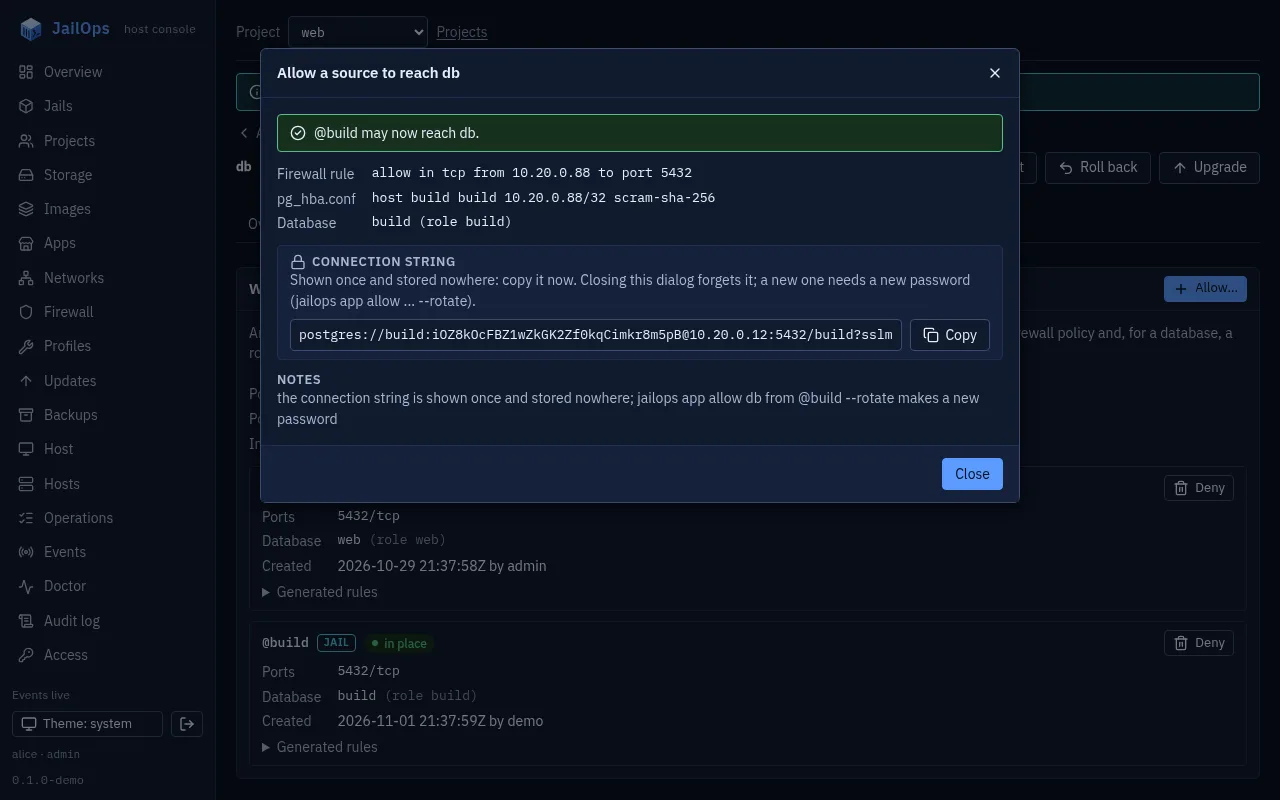
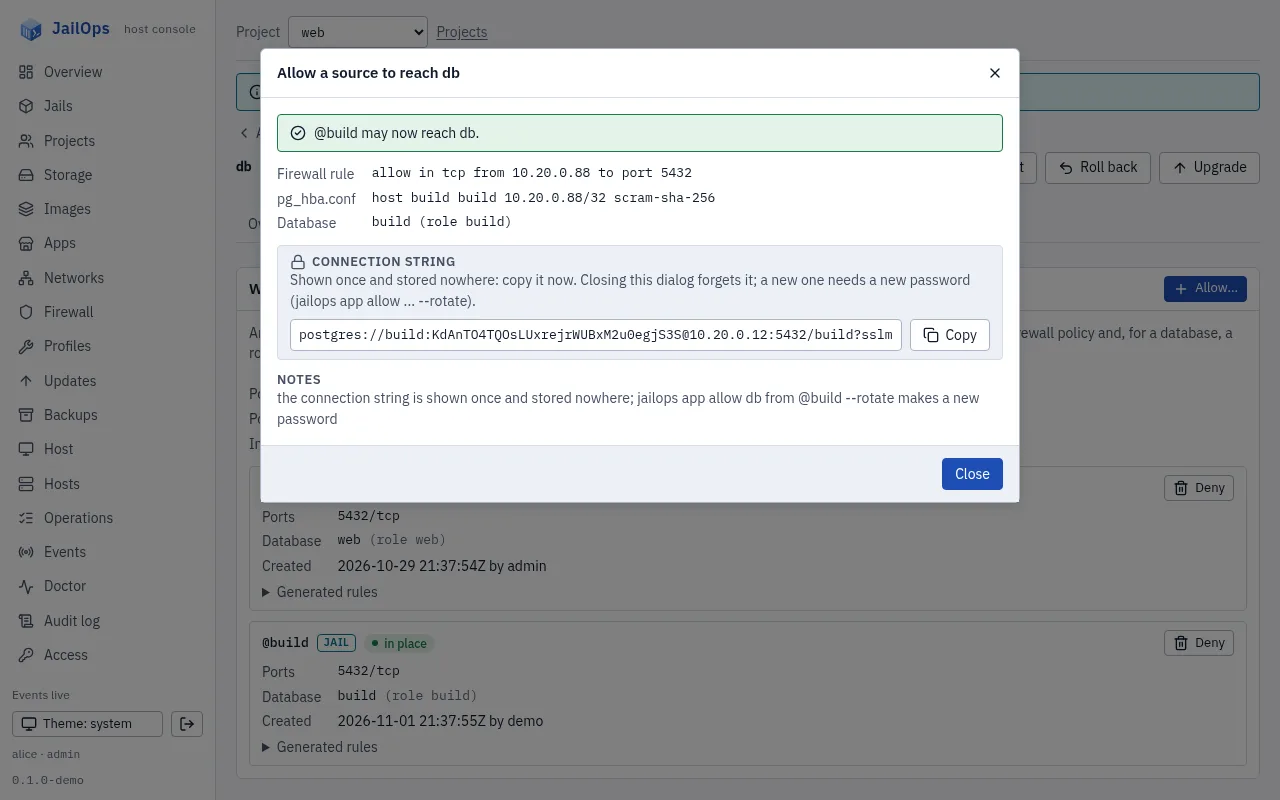
pg_hba.conf line, the connection string once. Demo data.In a fleet
Apps and their grants, in git.
jailops-sync declares apps (kind App) and who may connect to them (kind AppAccess), next to the jails, networks and policies of the fleet. Each entry is what jailops app allow is given.
apiVersion: jailops/v1
kind: AppAccess
metadata: {name: db}
hosts: [db1]
spec:
  grants:
    - {source: "jail:web", database: shop}
    - {source: "set:office"}
    - {source: host}
plan compares the list with the host: a missing grant is a create, a grant with drift an update, and a grant the document no longer lists is removed only with --prune. A connection string is printed once in the apply's output, never in the plan, a log or the repository.
The full description, with every source and every step: docs/apps.md, Who may connect.
Everything JailOps makes is labelled
ifconfig says what each interface is.
Every interface JailOps creates carries a short description: both ends of a jail's epair and a WireGuard tunnel. It is built from names only, so you can read a host's interfaces without a lookup table.
# ifconfig -a | grep 'description: jailops'
	description: jailops jail=demo/web net=lan (host side)
	description: jailops wireguard=office
# jailops doctor
...
net.descriptions    PASS    every interface of JailOps carries its description
Inside the jail, its end of the epair reads jailops jail=demo/web net=lan (jail side). The reconcile loop puts a missing or changed description back on an interface JailOps owns and touches no other, and jailops doctor reports it as net.descriptions.