App catalog · FreeBSD 15.1 and later
From catalog to running service. One command or one dialog.
Pick an app in the console or on the command line. JailOps gives it its own jail, installs its packages from the host, starts it, checks that it answers and takes a snapshot. You get the address, the data, the configuration and the logs.
- 2ways in: console or command line
- 1jail per app
- 8apps in the starter catalog
- 1snapshot to roll back to
In the console
Browse, preview, install. Then read the logs.
The host console has an Apps page. Seven screens, in the order you meet them. Demo data.
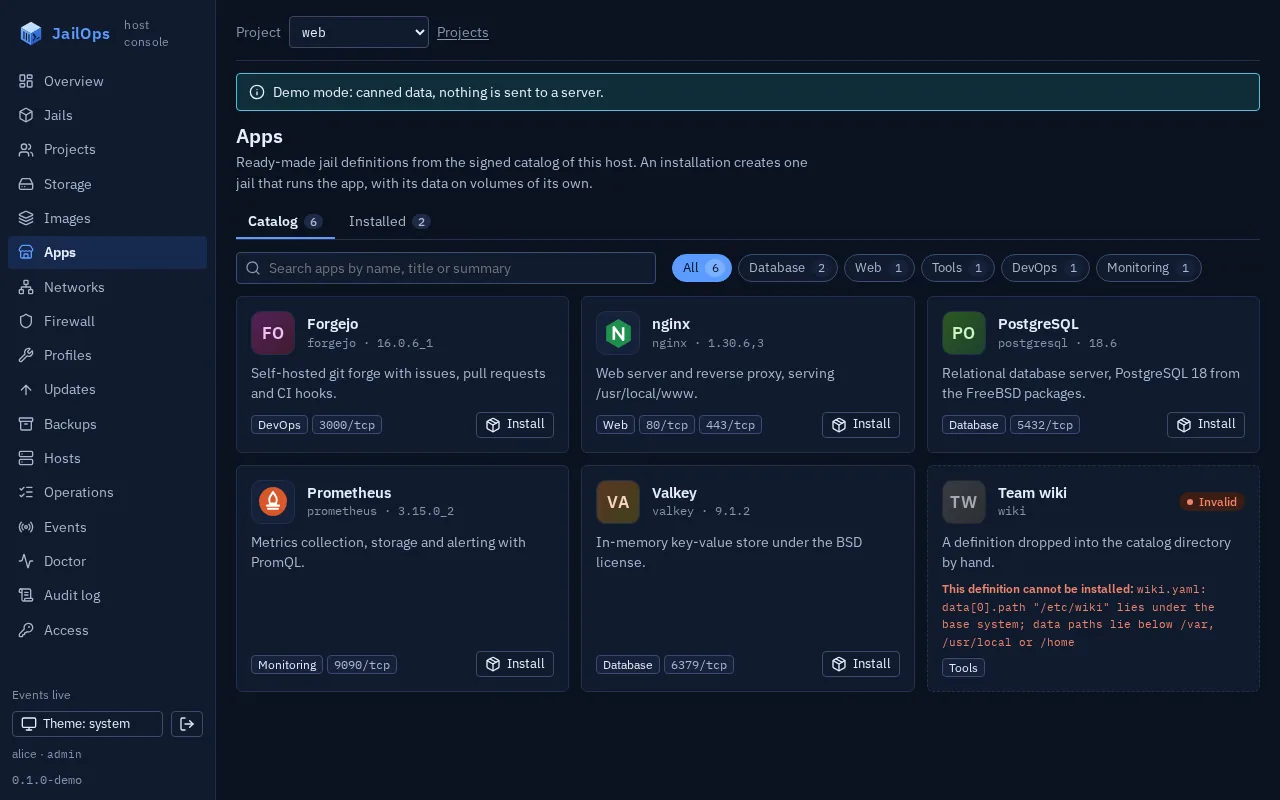
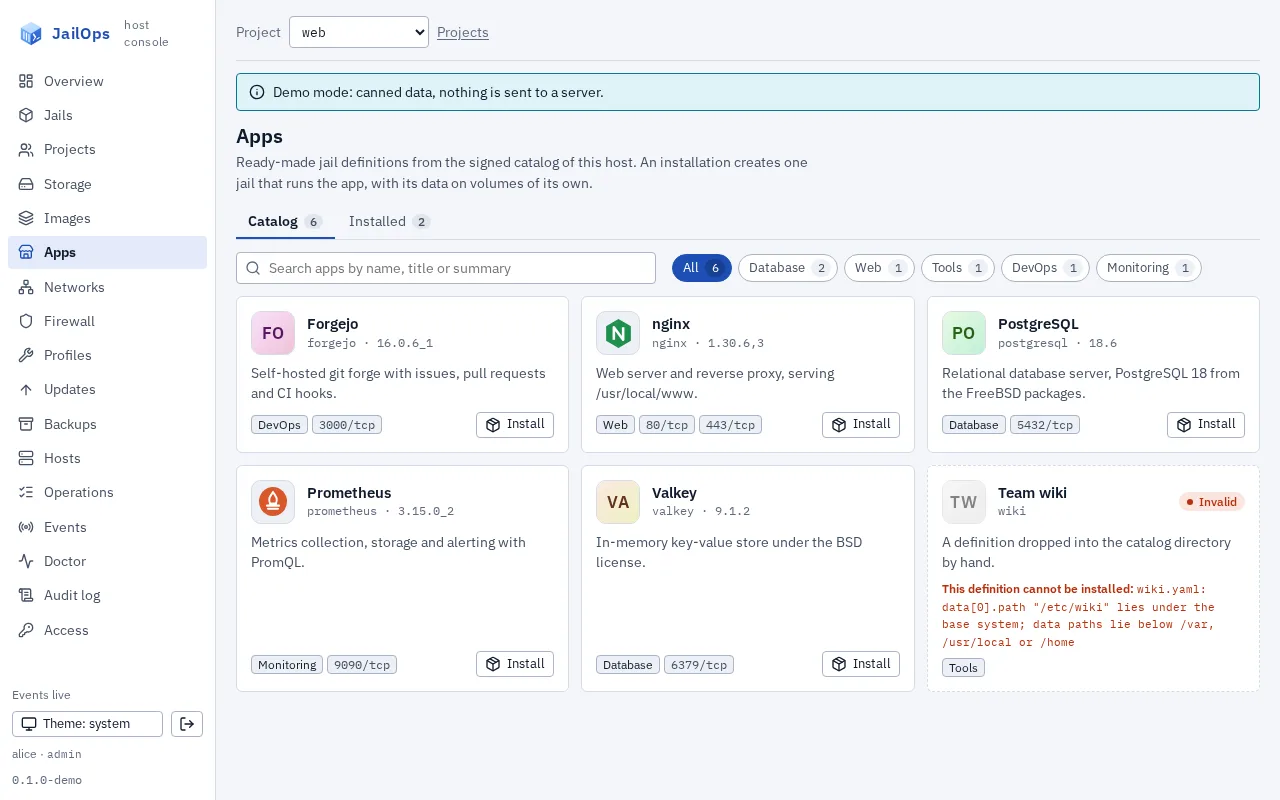
Browse the catalog
Every app as a card, with its version and its ports. Search by name, filter by category.
A definition that does not validate is shown with the reason and cannot be installed.
Know what you get
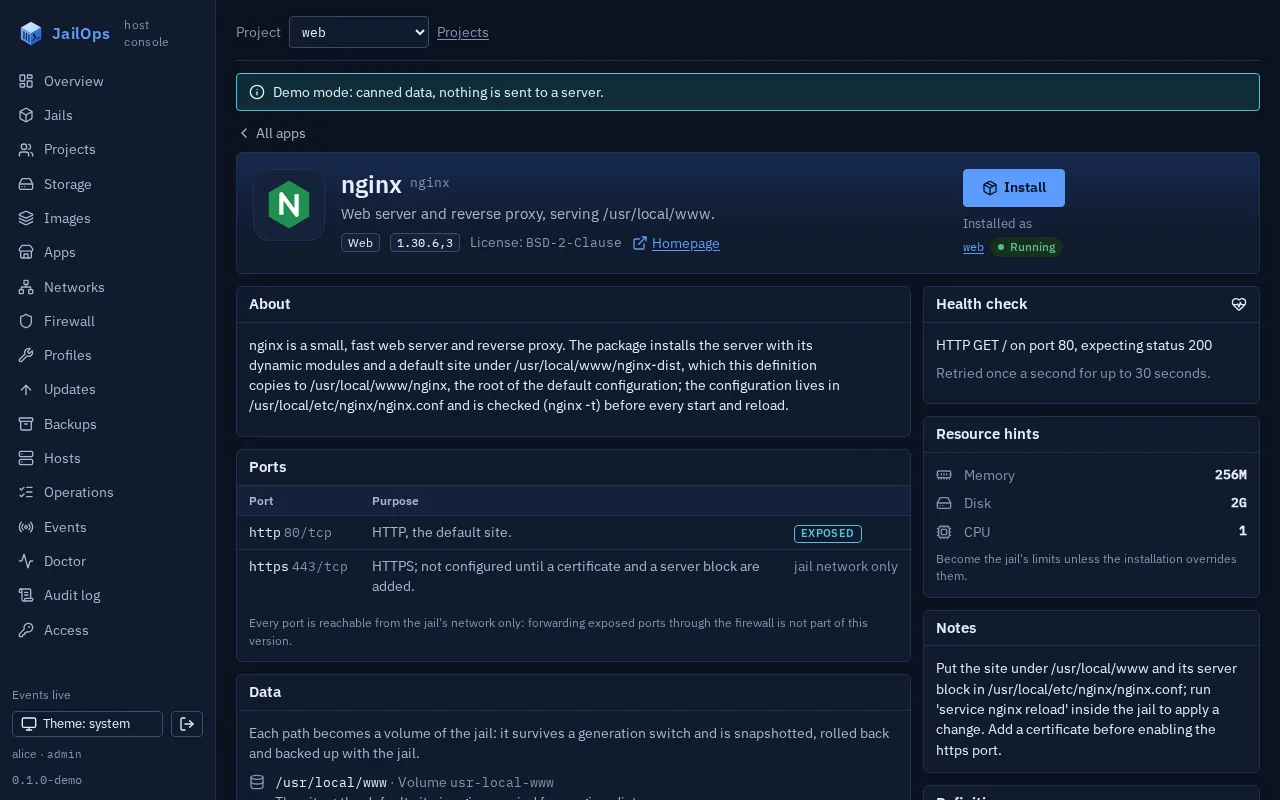
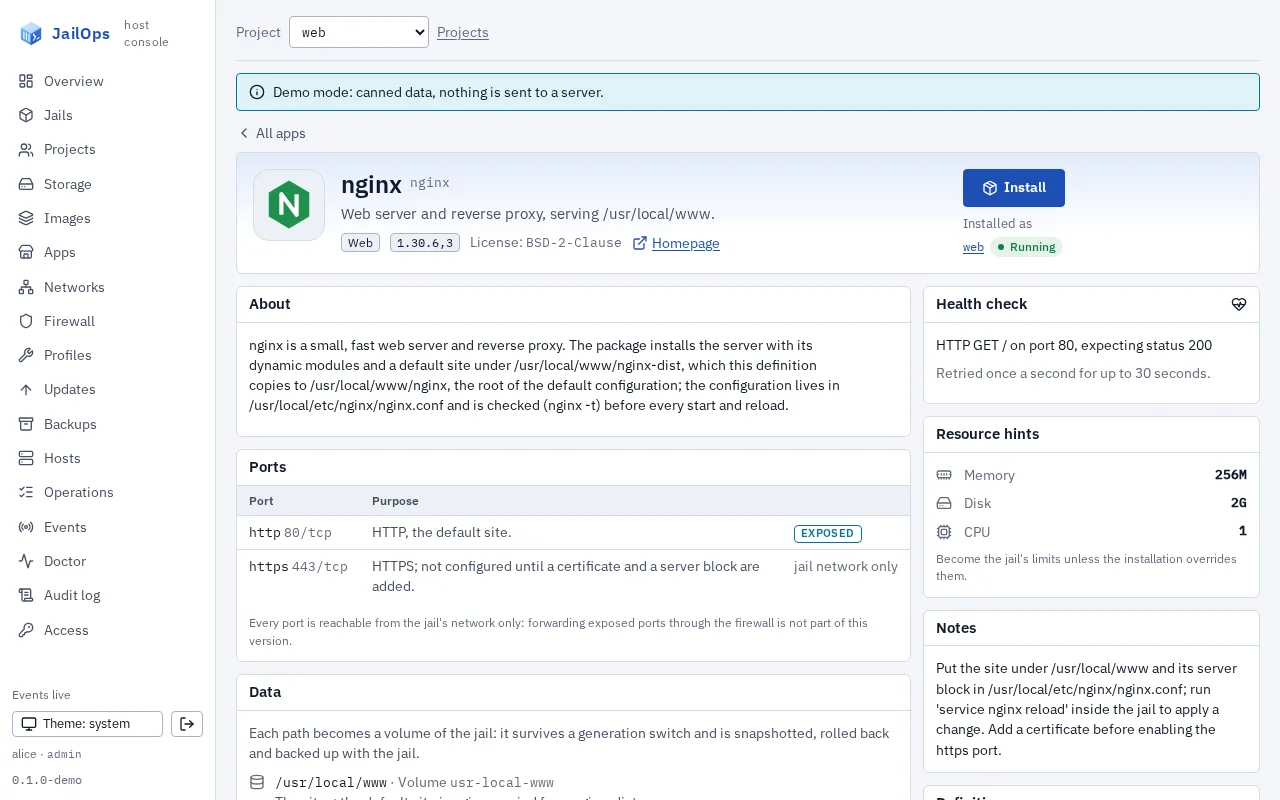
One page per app shows the whole definition before anything is installed.
Packages, services and their rc.conf settings, ports, data paths and the volume each becomes, configuration files, logs, the health check, resource hints and notes.
Preview the plan
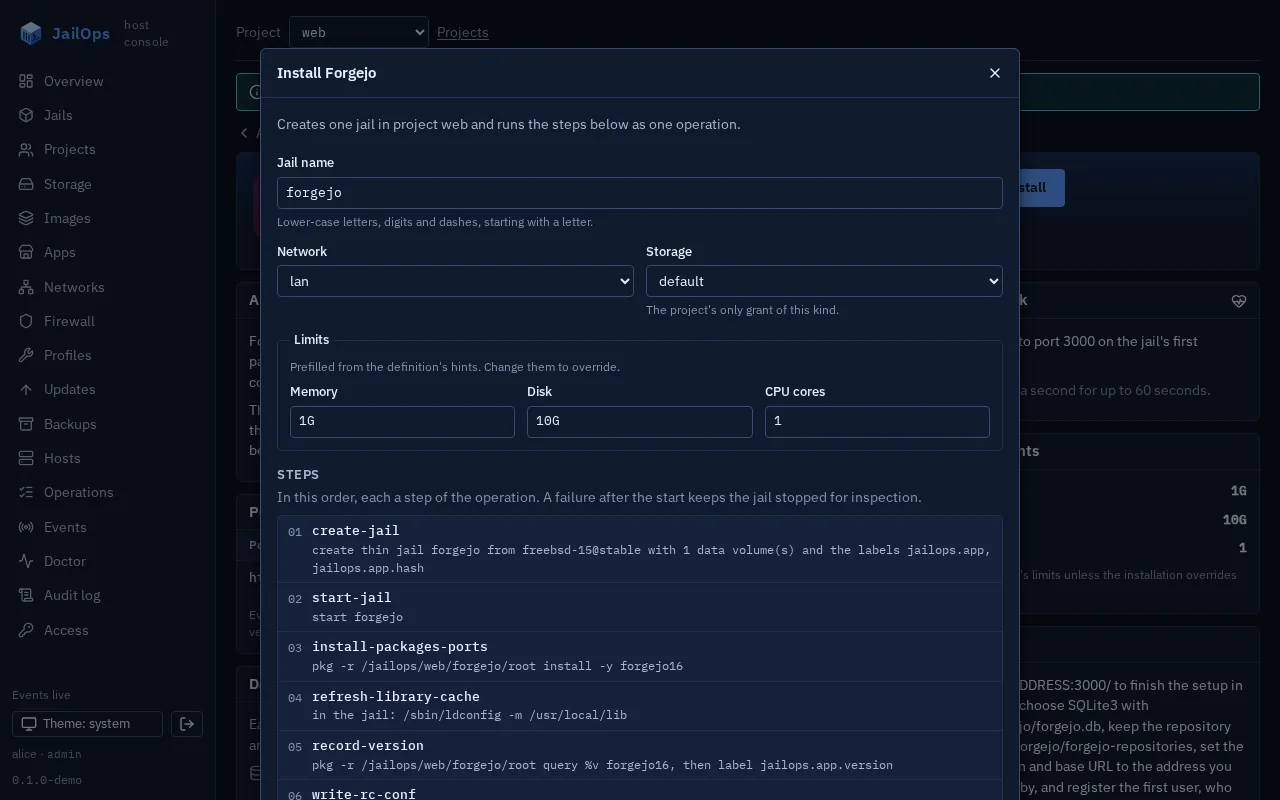
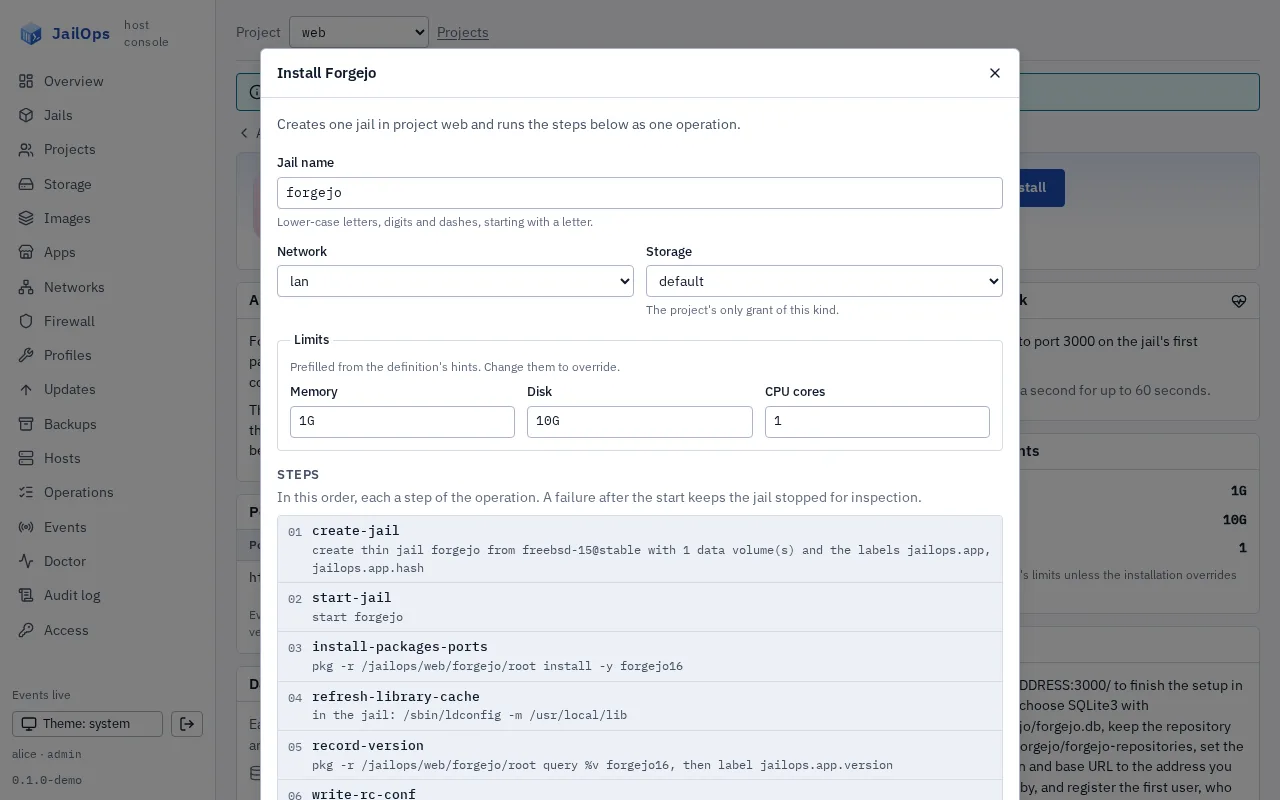
Name the jail, pick the network and the storage, adjust the limits. Preview steps lists what will run.
The preview is the server's dry run and creates nothing. Network and storage come from the project's grants, preset when there is one of a kind.
Watch it install
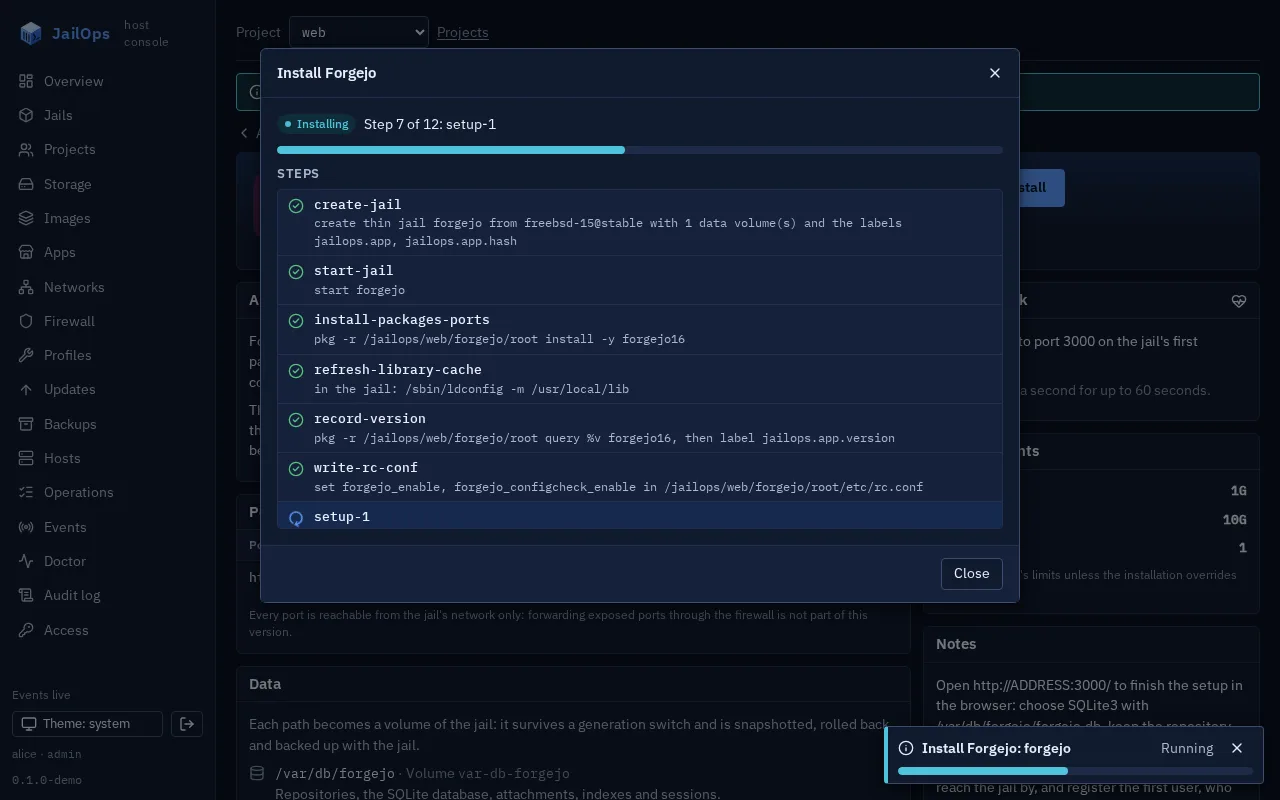
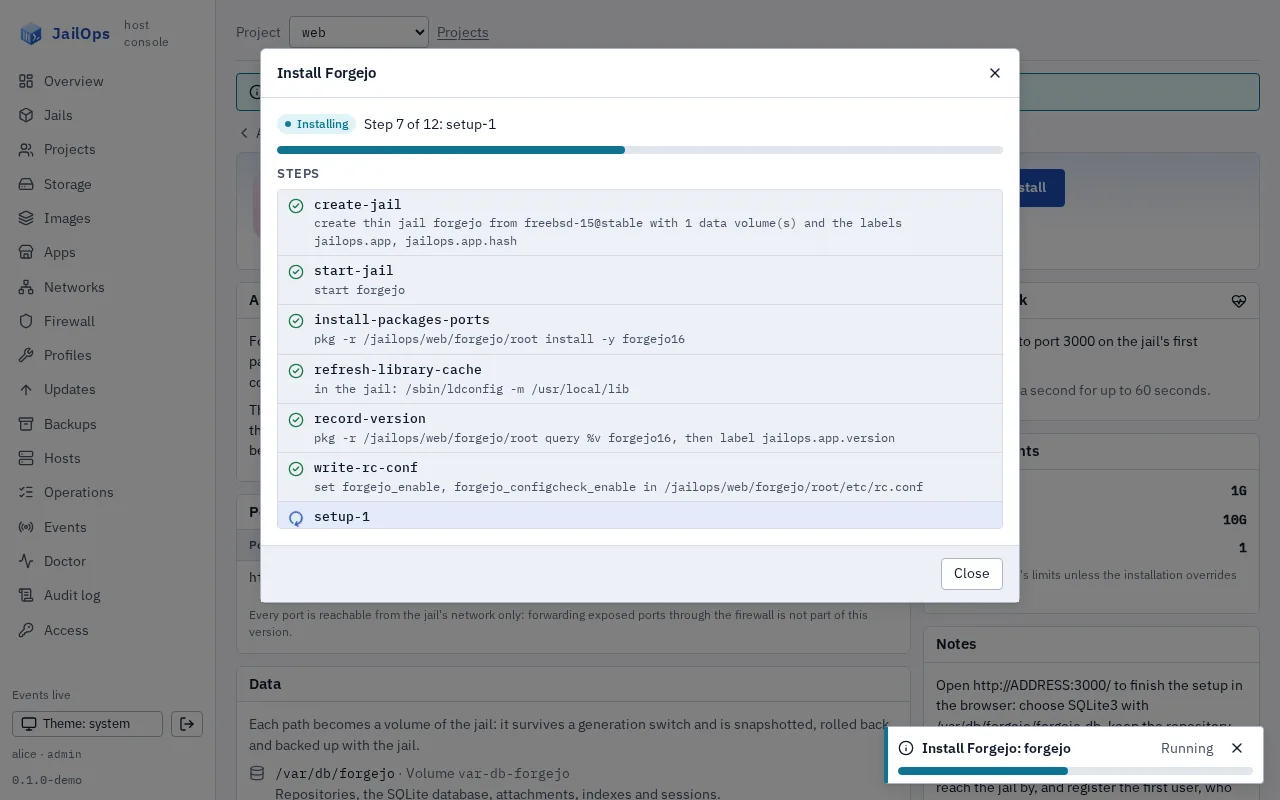
One operation on the server. The step list is ticked off as each step finishes.
The server records progress after every step, and the operation is in the journal like any other.
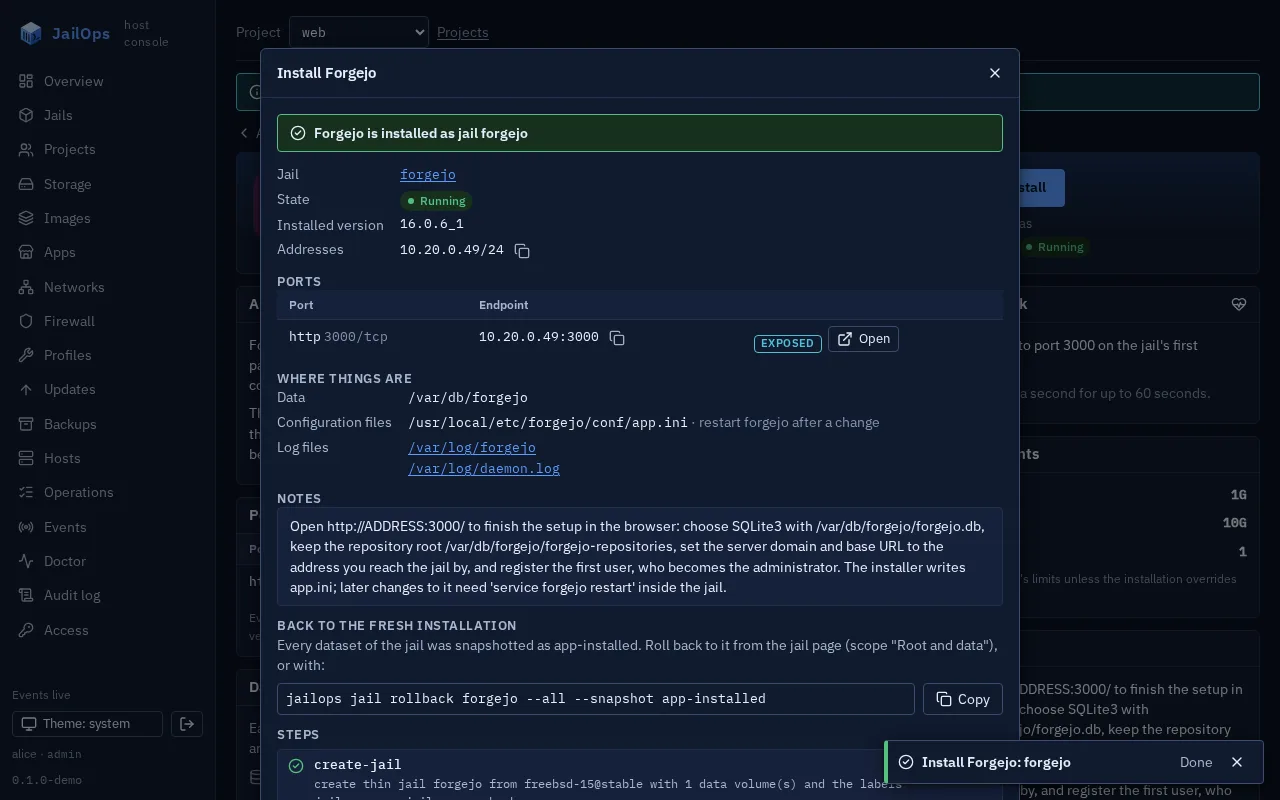
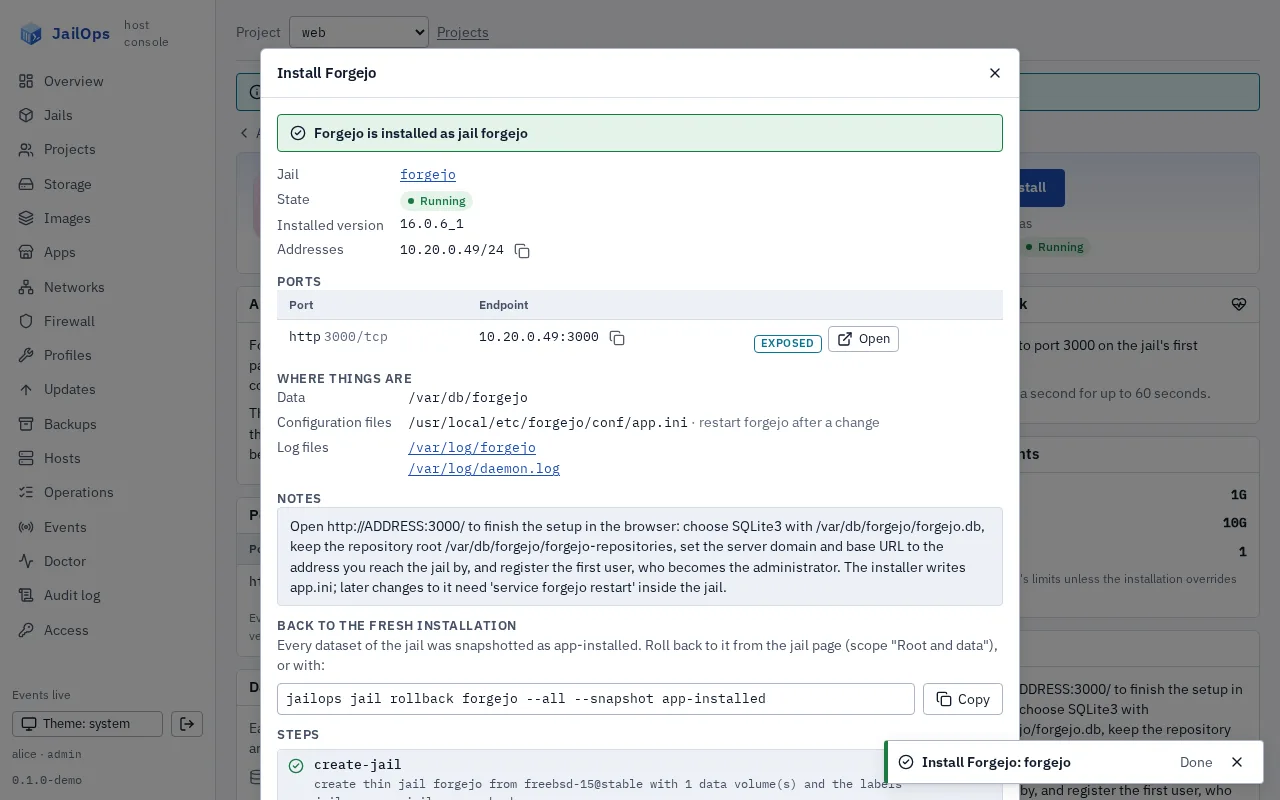
Get the report
The address, the port endpoints with an Open button, where the data, configuration and logs are, and the app's notes.
The app-installed snapshot, with the rollback command ready to copy. If a step fails, the report shows the error and the server's hint instead.
See what runs
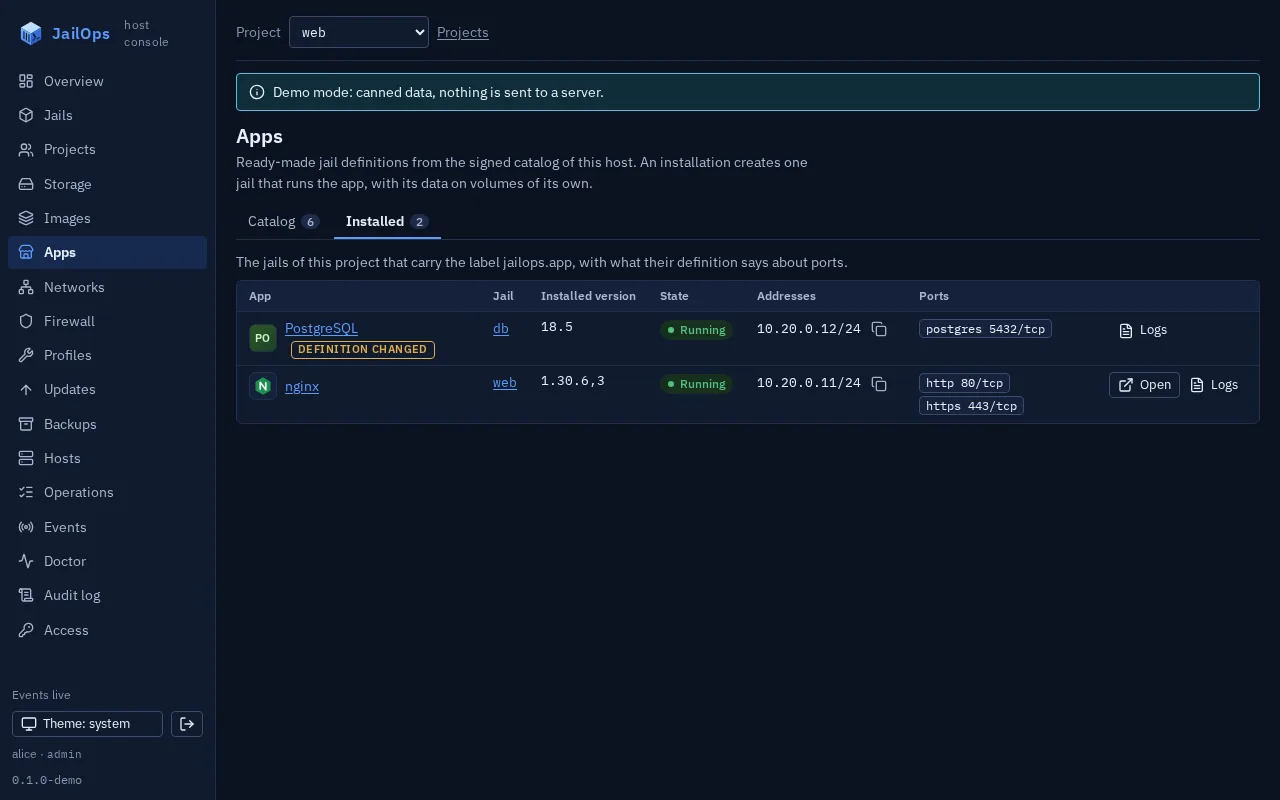
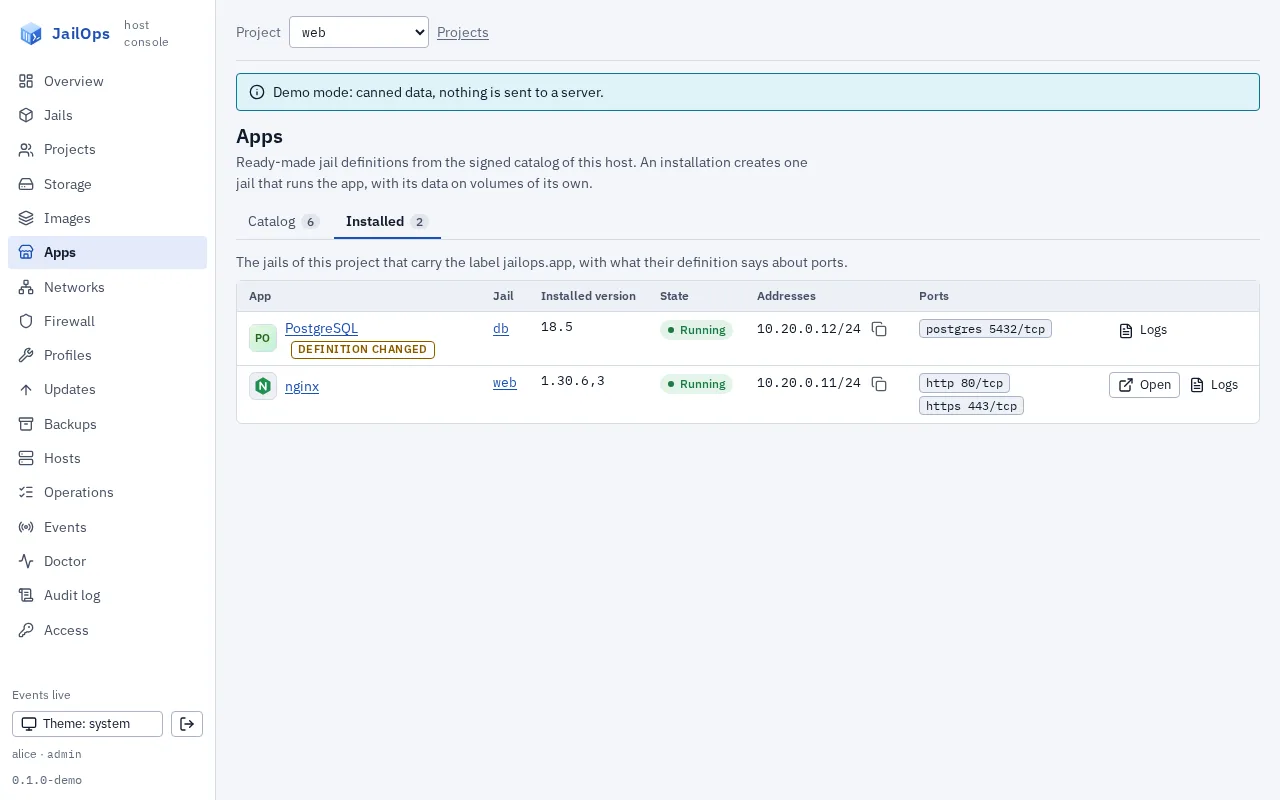
The Installed tab lists the project's jails that came from the catalog, with version, state, addresses and ports.
An Open link for exposed web ports, and a way to each jail's logs.
Read the logs
Every jail page has a Logs tab. No shell in the jail, no SSH.
The files below /var/log, the last lines, since a time, a text filter, follow as the file grows, copy and download. It needs the operator role, and reads are recorded in the audit log.
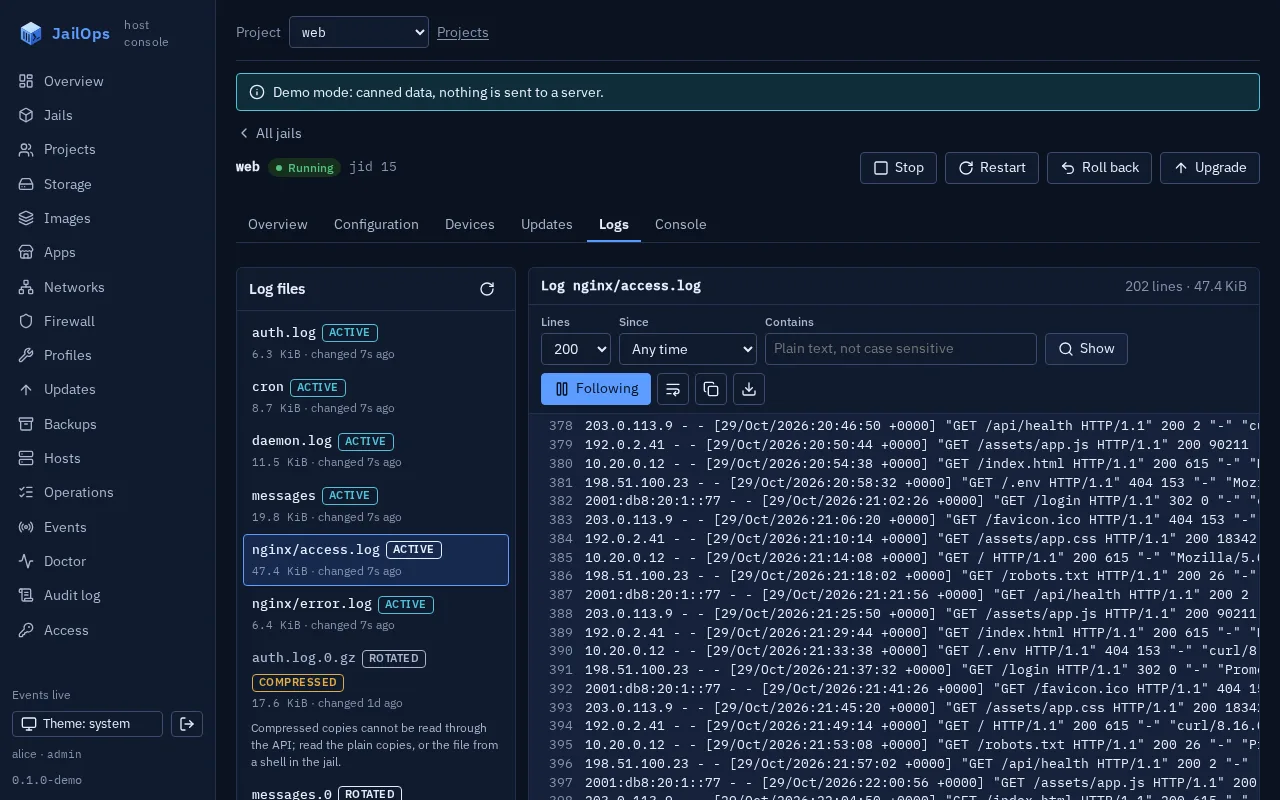
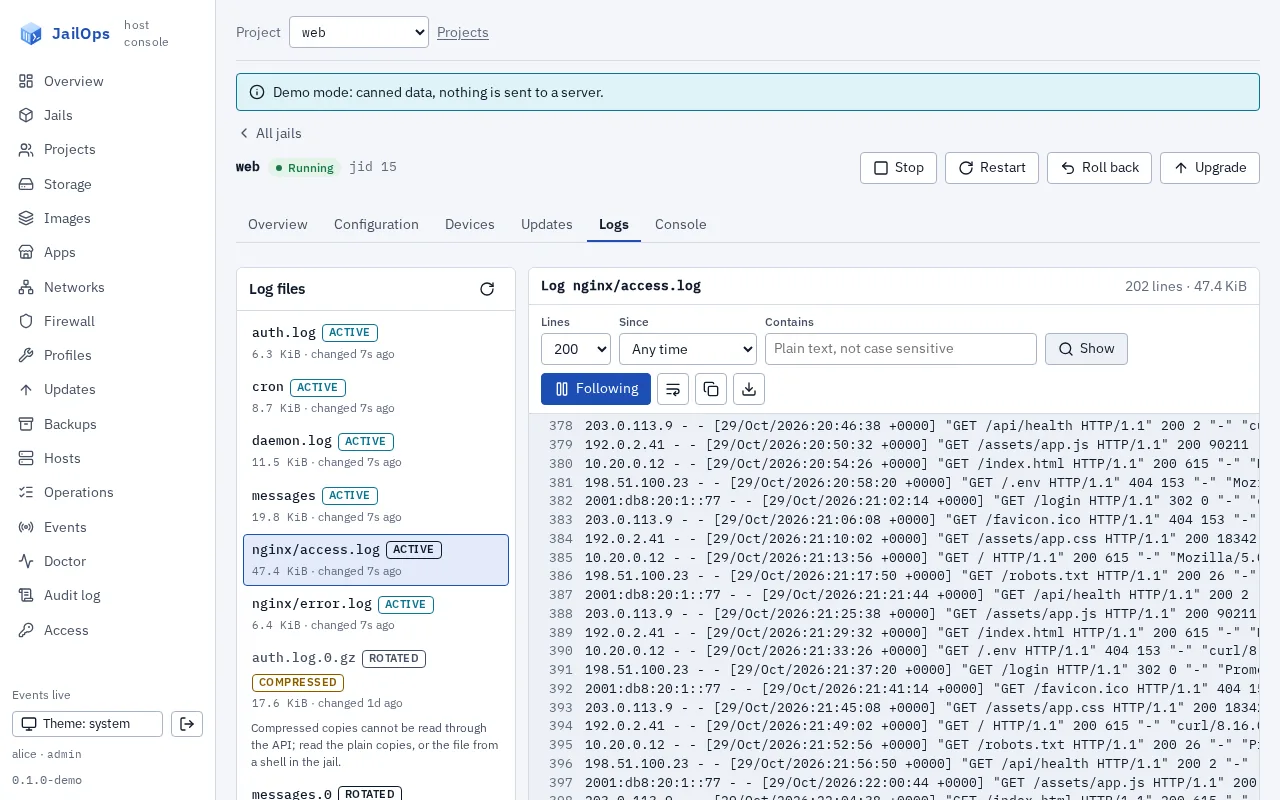
The console comes with JailOps. Turn it on, open Apps, pick one.
On the command line
Prefer the terminal? One command.
The same operation, the same steps. Add --dry-run to see the plan first.
$ jailops app install nginx --dry-run
Dry run: nothing was created. Installing app nginx as jail nginx would do:
01 create-jail: create thin jail nginx from freebsd-15-1 with 1 data volume(s) and the labels jailops.app, jailops.app.hash
02 start-jail: start nginx
03 install-packages-ports: pkg -r /zroot/jailops/projects/web/jails/nginx/root install -y nginx
04 set-up-shell: install bash unless it is there (pkg -r /zroot/jailops/projects/web/jails/nginx/root install -y bash); write the bash prompt /usr/local/etc/profile.d/jailops-prompt.sh and source it from /usr/local/etc/profile and /usr/local/etc/bash.bashrc
05 refresh-library-cache: in the jail: /sbin/ldconfig -m /usr/local/lib
06 record-version: pkg -r /zroot/jailops/projects/web/jails/nginx/root query %v nginx, then label jailops.app.version
07 write-rc-conf: set nginx_enable in /zroot/jailops/projects/web/jails/nginx/root/etc/rc.conf
08 setup-1: in the jail: /bin/mkdir -p /usr/local/www/nginx
09 setup-2: in the jail: /bin/cp -Rn /usr/local/www/nginx-dist/. /usr/local/www/nginx/
10 start-service-nginx: in the jail: /usr/sbin/service nginx start
11 health-check: GET http://<first address>:80/ must answer 200, retried for 30s
12 close-firewall: firewall policy app-nginx (managed by app access): deny every inbound connection until jailops app allow nginx --from SOURCE
13 snapshot: snapshot every dataset of nginx as app-installed
$ jailops app install nginx
# thirteen steps, then the report: addresses, ports, data, configuration, logs, notes
$ jailops app installed
JAIL    APP     VERSION    STATE     ADDRESSES   PORTS
nginx   nginx   1.30.6,3   running   10.77.0.4   80/tcp,443/tcp
The steps as --dry-run prints them for the starter catalog's nginx. The pool, project and address are examples.
The starter catalog
Eight apps, ready to install
Each app is a short definition: its packages, services, ports, data, configuration, logs and health check. Pick one, install it from the console or with one command.
- 0.9.0
isms
SecurityInformation security management platform with git-native documents; needs PostgreSQL.
Ports 8080/tcp
- Data
/var/db/ismson its own dataset - Healthnone: it is not started until you configure it
- Logsisms.log
jailops app install ismsFull specification: ismsisms in the catalog - Data
- 18.6
PostgreSQL
DatabaseRelational database server, PostgreSQL 18 from the FreeBSD packages.
Ports 5432/tcp
- Data
/var/db/postgreson its own dataset - Healthpg_isready -U postgres succeeds in the jail
- Logsmessages
jailops app install postgresqlFull specification: PostgreSQLPostgreSQL in the catalog - Data
- 16.0.6_1
Forgejo
DevOpsSelf-hosted git forge with issues, pull requests and CI hooks.
Ports 3000/tcp
- Data
/var/db/forgejoon its own dataset - Healthport 3000 accepts a connection
- Logsforgejo, daemon.log
jailops app install forgejoFull specification: ForgejoForgejo in the catalog - Data
- 1.30.6,3
nginx
WebWeb server and reverse proxy, serving /usr/local/www.
Ports 80/tcp, 443/tcp
- Data
/usr/local/wwwon its own dataset - HealthGET :80/ answers 200
- Logsnginx/access.log, nginx/error.log
jailops app install nginxFull specification: nginxnginx in the catalog - Data
- 3.15.0_2
Prometheus
MonitoringMetrics collection, storage and alerting with PromQL.
Ports 9090/tcp
- Data
/var/db/prometheuson its own dataset - HealthGET :9090/-/healthy answers 200
- Logsdaemon.log
jailops app install prometheusFull specification: PrometheusPrometheus in the catalog - Data
- 9.1.2
Valkey
DatabaseIn-memory key-value store under the BSD license.
Ports 6379/tcp
- Data
/var/db/valkeyon its own dataset - Healthvalkey-cli ping succeeds in the jail
- Logsvalkey/valkey.log
jailops app install valkeyFull specification: ValkeyValkey in the catalog - Data
- 4.15
NSD
NetworkAuthoritative DNS server for your own zones, as a primary or a secondary.
Ports 53/udp, 53/tcp
- Data
/var/db/nsdon its own dataset - Healthport 53 accepts a connection
- Logsdaemon.log
jailops app install nsdFull specification: NSDNSD in the catalog - Data
- 3.10
Mail (Postfix and Dovecot)
CommunicationA starting point for a single-domain mail server, SMTP with Postfix and IMAP with Dovecot.
Ports 25/tcp, 587/tcp, 143/tcp, 993/tcp
- Data
/home/mail/var/spool/postfixon its own dataset - Healthport 25 accepts a connection
- Logsmaillog
jailops app install mailFull specification: Mail (Postfix and Dovecot)Mail (Postfix and Dovecot) in the catalog - Data
Search every app, see what each one installs and what has been tested on FreeBSD.
Full specifications
Everything a definition says, as jailops app info NAME shows it. Every port stays closed until you allow a source with jailops app allow.
ismsInformation security management platform with git-native documents; needs PostgreSQL.0.9.0
- Install
jailops app install isms- Packages
isms0.9.0, from pkg.jailops.netopenssh-portable(current), from the FreeBSD repository
- Services
isms:isms_enable="YES", not started
- Ports
8080/tcphttp: The web interface and the API (UNVERIFIED port); put a TLS proxy in front.
- Data
/var/db/ismson the datasetvar-db-isms: The per-organisation git repositories, file blobs, templates and the signing key.
- Configuration
/usr/local/etc/isms/server.env: KEY=VALUE settings with the database URL and the master secret; mode 0600, owner isms. Restart:isms.
- Logs
/var/log/isms.log: What the program prints, written by daemon(8).
- Setup
/bin/mkdir -p /var/db/isms/private/usr/sbin/chown isms:isms /var/db/isms /var/db/isms/private /usr/local/etc/isms/server.env/bin/chmod 0750 /var/db/isms/bin/chmod 0700 /var/db/isms/private/bin/chmod 0600 /usr/local/etc/isms/server.env
- Health check
- None: the service is not started until you have configured it
- Resource hints
- 1G memory, 10G disk, 1 CPU
- License
- Apache-2.0
- Notes
isms is enabled but not started. Until server.env is complete, a restart of the jail starts it and it exits again every 5 seconds; /var/log/isms.log says why. Do these steps once (DB is a postgresql jail, ADDR this jail's address):
- In DB: jailops shell DB, then su -l postgres -c psql and run
CREATE ROLE isms LOGIN PASSWORDPW; CREATE DATABASE isms OWNER isms;
Set listen_addresses =*in postgresql.conf, add to pg_hba.conf
host isms isms ADDR/32 scram-sha-256 and run service postgresql restart. - In this jail (jailops shell NAME), edit /usr/local/etc/isms/server.env:
DATABASE_URL="postgres://isms:PW@DB_ADDRESS:5432/isms?sslmode=disable",
ISMS_BASE_URL (the https URL users open) and ISMS_SIGNING_EMAIL. - Set the master secret once and back it up; never change it later:
sed -i '' "s|^ISMS_SECRET=.*|ISMS_SECRET=$(openssl rand -hex 32)|" /usr/local/etc/isms/server.env - Create the signing key (your ISMS_SIGNING_EMAIL as the comment):
su -m isms -cssh-keygen -q -t ed25519 -N "" -C you@example.com -f /var/db/isms/private/isms_key - Apply the schema:
env ISMS_SERVER_ENV=/usr/local/etc/isms/server.env su -m isms -c/usr/local/bin/isms server migrate - service isms start
The web interface is on port 8080 (UNVERIFIED); serve it over https through the nginx app. A coming version wires apps together with jailops app allow (role, password and DATABASE_URL made for you); until then, these steps.
- In DB: jailops shell DB, then su -l postgres -c psql and run
- Catalog page
- isms in the catalog
PostgreSQLRelational database server, PostgreSQL 18 from the FreeBSD packages.18.6
- Install
jailops app install postgresql- Packages
postgresql18-server18.6, from the FreeBSD repository
- Services
postgresql:postgresql_enable="YES", started
- Ports
5432/tcppostgres: The SQL port; listens on localhost until listen_addresses is set.
- Data
/var/db/postgreson the datasetvar-db-postgres: The cluster (data18) and the home of the postgres user.
- Configuration
/var/db/postgres/data18/postgresql.conf: Server settings, including listen_addresses and logging. Restart:postgresql./var/db/postgres/data18/pg_hba.conf: Who may connect from where, and how they authenticate. Restart:postgresql.
- Logs
/var/log/messages: The port logs to syslog by default (log_destination in postgresql.conf).
- Setup
/usr/sbin/chown postgres:postgres /var/db/postgres/usr/sbin/service postgresql initdb
- Health check
- Command: pg_isready -U postgres succeeds in the jail, retried for 60 seconds
- Resource hints
- 1G memory, 10G disk, 1 CPU
- License
- PostgreSQL
- Notes
Connect from inside the jail with: jailops exec NAME -- su -l postgres -c psql
The jail accepts no connection from outside until you allow one:
jailops app allow NAME --from jail:web makes a role and a database for the jail web, lets its address in and prints the connection string once.- Catalog page
- PostgreSQL in the catalog
ForgejoSelf-hosted git forge with issues, pull requests and CI hooks.16.0.6_1
- Install
jailops app install forgejo- Packages
forgejo1616.0.6_1, from the FreeBSD repository
- Services
forgejo:forgejo_enable="YES",forgejo_configcheck_enable="NO", started
- Ports
3000/tcphttp: The web interface and the HTTP git endpoint.
- Data
/var/db/forgejoon the datasetvar-db-forgejo: Repositories, the SQLite database, attachments, indexes and sessions.
- Configuration
/usr/local/etc/forgejo/conf/app.ini: The configuration the web installer writes; secrets included, keep it private. Restart:forgejo.
- Logs
/var/log/forgejo: Log files, when the [log] section writes files./var/log/daemon.log: What the service prints; daemon(8) sends it to syslog as daemon.info.
- Setup
/bin/rm -f /usr/local/etc/forgejo/conf/app.ini/usr/sbin/chown -R git:git /usr/local/etc/forgejo/usr/sbin/chown -R git:git /var/db/forgejo /var/log/forgejo
- Health check
- TCP: port 3000 accepts a connection, retried for 60 seconds
- Resource hints
- 1G memory, 10G disk, 1 CPU
- License
- MIT
- Notes
Open http://ADDRESS:3000/ to finish the setup in the browser: choose SQLite3 with /var/db/forgejo/forgejo.db, keep the repository root /var/db/forgejo/forgejo-repositories, set the server domain and base URL to the address you reach the jail by, and register the first user, who becomes the administrator. The installer writes app.ini; later changes to it need
service forgejo restartinside the jail.- Catalog page
- Forgejo in the catalog
nginxWeb server and reverse proxy, serving /usr/local/www.1.30.6,3
- Install
jailops app install nginx- Packages
nginx1.30.6,3, from the FreeBSD repository
- Services
nginx:nginx_enable="YES", started
- Ports
80/tcphttp: HTTP, the default site.443/tcphttps: HTTPS; not configured until a certificate and a server block are added.
- Data
/usr/local/wwwon the datasetusr-local-www: The sites; the default site is nginx, copied from nginx-dist.
- Configuration
/usr/local/etc/nginx/nginx.conf: The server configuration; 'service nginx reload' applies most changes without a restart. Restart:nginx.
- Logs
/var/log/nginx/access.log: One line per request./var/log/nginx/error.log: Errors and warnings of the server.
- Setup
/bin/mkdir -p /usr/local/www/nginx/bin/cp -Rn /usr/local/www/nginx-dist/. /usr/local/www/nginx/
- Health check
- HTTP: GET :80/ answers 200, retried for 30 seconds
- Resource hints
- 256M memory, 2G disk, 1 CPU
- License
- BSD-2-Clause
- Notes
Put the site under /usr/local/www and its server block in /usr/local/etc/nginx/nginx.conf; run
service nginx reloadinside the jail to apply a change. Add a certificate before enabling the https port.- Catalog page
- nginx in the catalog
PrometheusMetrics collection, storage and alerting with PromQL.3.15.0_2
- Install
jailops app install prometheus- Packages
prometheus33.15.0_2, from the FreeBSD repository
- Services
prometheus:prometheus_enable="YES", started
- Ports
9090/tcphttp: The web interface, the query API and /metrics.
- Data
/var/db/prometheuson the datasetvar-db-prometheus: The time series database (storage.tsdb.path).
- Configuration
/usr/local/etc/prometheus.yml: Scrape targets, rule files and alertmanagers; 'service prometheus reload' applies a change. Restart:prometheus.
- Logs
/var/log/daemon.log: The server log; daemon(8) sends it to syslog as daemon.info.
- Setup
/usr/sbin/chown prometheus:prometheus /var/db/prometheus
- Health check
- HTTP: GET :9090/-/healthy answers 200, retried for 60 seconds
- Resource hints
- 1G memory, 20G disk, 1 CPU
- License
- Apache-2.0
- Notes
Add scrape targets under scrape_configs in /usr/local/etc/prometheus.yml and run
service prometheus reloadinside the jail. Retention defaults to 15 days; set prometheus_args="--storage.tsdb.retention.time=90d" in the jail's rc.conf to change it.- Catalog page
- Prometheus in the catalog
ValkeyIn-memory key-value store under the BSD license.9.1.2
- Install
jailops app install valkey- Packages
valkey9.1.2, from the FreeBSD repository
- Services
valkey:valkey_enable="YES", started
- Ports
6379/tcpvalkey: The protocol port; bound to localhost until bind is changed.
- Data
/var/db/valkeyon the datasetvar-db-valkey: Snapshots and the append-only file.
- Configuration
/usr/local/etc/valkey.conf: The server configuration (bind, protected-mode, persistence). Restart:valkey.
- Logs
/var/log/valkey/valkey.log: The server log.
- Setup
/bin/mkdir -p /var/log/valkey /var/run/valkey/usr/sbin/chown valkey:valkey /var/db/valkey /var/log/valkey /var/run/valkey
- Health check
- Command: valkey-cli ping succeeds in the jail, retried for 30 seconds
- Resource hints
- 512M memory, 2G disk, 1 CPU
- License
- BSD-3-Clause
- Notes
Talk to it from inside the jail with: jailops exec NAME -- valkey-cli
To reach it from other jails, set bind and requirepass in valkey.conf and restart the service.- Catalog page
- Valkey in the catalog
NSDAuthoritative DNS server for your own zones, as a primary or a secondary.4.15
- Install
jailops app install nsd- Packages
nsd4.15, from the FreeBSD repository
- Services
nsd:nsd_enable="YES", started
- Ports
53/udpdns: DNS queries over UDP.53/tcpdns-tcp: DNS over TCP, large answers and zone transfers.
- Data
/var/db/nsdon the datasetvar-db-nsd: Zone files (zones/), transferred zones and the state of the transfer daemon.
- Configuration
/usr/local/etc/nsd/nsd.conf: Server and zone settings; check with nsd-checkconf before a restart. Restart:nsd.
- Logs
/var/log/daemon.log: NSD logs to syslog (facility daemon) unless logfile is set.
- Setup
/bin/mkdir -p /var/db/nsd/zones /var/run/nsd/bin/sh -c "f=/usr/local/etc/nsd/nsd.conf; grep -q 'Starter configuration of the nsd app'…/bin/sh -c "f=/var/db/nsd/zones/example.com.zone; [ -e $f ] || printf '%s\\n' '$ORIGIN ex…/usr/sbin/chown -R nsd:nsd /var/db/nsd /var/run/nsd/usr/local/sbin/nsd-checkconf /usr/local/etc/nsd/nsd.conf/usr/local/sbin/nsd-checkzone example.com /var/db/nsd/zones/example.com.zone
- Health check
- TCP: port 53 accepts a connection, retried for 30 seconds
- Resource hints
- 256M memory, 2G disk, 1 CPU
- License
- BSD-3-Clause
- Notes
The server answers for example.com from /var/db/nsd/zones/example.com.zone. Put your zone files there, name each in a zone: block of /usr/local/etc/nsd/nsd.conf, run nsd-checkconf /usr/local/etc/nsd/nsd.conf and service nsd restart. Raise the SOA serial with every change.
Primary (this jail 192.0.2.53, the secondary 198.51.100.53), in the zone: block:
notify: 198.51.100.53 NOKEYprovide-xfr: 198.51.100.53 NOKEYSecondary (the primary 192.0.2.53), in the zone: block, after deleting the starter zone file (the transfer writes it):
allow-notify: 192.0.2.53 NOKEYrequest-xfr: 192.0.2.53 NOKEYUse a TSIG key instead of NOKEY across untrusted networks: a key: block with name, algorithm hmac-sha256 and secret, the same on both sides, and its name in place of NOKEY. Delegate the zone at its parent to both servers.
- Catalog page
- NSD in the catalog
Mail (Postfix and Dovecot)A starting point for a single-domain mail server, SMTP with Postfix and IMAP with Dovecot.3.10
- Install
jailops app install mail- Packages
postfix3.10, from the FreeBSD repositorydovecot2.3, from the FreeBSD repository
- Services
postfix:postfix_enable="YES",sendmail_enable="NONE", starteddovecot:dovecot_enable="YES", started
- Ports
25/tcpsmtp: Mail from other servers to your domain.587/tcpsubmission: Mail from your users; needs TLS and a login, so not usable until a certificate is set.143/tcpimap: IMAP; logins are refused without TLS except from the jail itself.993/tcpimaps: IMAP over TLS; not listening until a certificate is configured.
- Data
/home/mailon the datasethome-mail: The mail users' homes and their Maildir mailboxes./var/spool/postfixon the datasetvar-spool-postfix: The Postfix queue.
- Configuration
/usr/local/etc/postfix/main.cf: Postfix settings (domain, TLS); 'postfix reload' applies a change. Restart:postfix./usr/local/etc/postfix/master.cf: The Postfix services, including submission on 587. Restart:postfix./usr/local/etc/dovecot/dovecot.conf: Dovecot settings (written at the installation for Dovecot 2.3). Restart:dovecot.
- Logs
/var/log/maillog: Both servers log to syslog, facility mail.
- Setup
/bin/sh -c "cd /usr/local/etc/postfix && for f in main.cf master.cf; do [ -e $f ] || cp $…/usr/local/sbin/postconf -e "mydomain = example.com" "myhostname = mail.example.com" "myo…/usr/local/sbin/postconf -M "submission/inet=submission inet n - n - - smtpd"/usr/local/sbin/postconf -P submission/inet/syslog_name=postfix/submission submission/ine…/usr/local/sbin/postfix set-permissions/usr/local/sbin/postfix check/usr/local/sbin/postalias /etc/mail/aliases/bin/mkdir -p /usr/local/etc/mail/bin/sh -c "printf '%s\\t%s\\n' sendmail /usr/local/sbin/sendmail send-mail /usr/local/sb…/bin/sh -c "f=/usr/local/etc/dovecot/dovecot.conf; [ -e $f ] || printf '%s\\n' '# Starter…/usr/local/bin/doveconf -n
- Health check
- TCP: port 25 accepts a connection, retried for 60 seconds
- Resource hints
- 512M memory, 20G disk, 1 CPU
- License
- EPL-2.0 OR IPL-1.0 (Postfix), MIT and LGPL-2.1 (Dovecot)
- Notes
A starting point: example.com, no TLS. In the jail (jailops shell NAME):
- Domain: postconf -e
mydomain = YOUR.DOMAINmyhostname = mail.YOUR.DOMAIN, then postfix reload. - A user: pw useradd -n alice -d /home/mail/alice -m -s /usr/sbin/nologin, then passwd alice. Mail to alice@YOUR.DOMAIN lands in ~alice/Maildir.
- TLS: put a certificate and key in the jail, then postconf -e
smtpd_tls_cert_file = CERTsmtpd_tls_key_file = KEYsmtpd_tls_security_level = mayand postfix reload; in dovecot.conf set ssl = required, ssl_cert = <CERT, ssl_key = <KEY, delete the port = 0 line of the imaps listener and service dovecot restart. Then clients use 587 and 993 with a login.
DNS for YOUR.DOMAIN (the jail's public address must be reachable on 25):
- A/AAAA: mail.YOUR.DOMAIN -> the address; PTR of the address back to mail.YOUR.DOMAIN (set by whoever owns the address).
- MX: YOUR.DOMAIN -> 10 mail.YOUR.DOMAIN
- SPF: TXT on YOUR.DOMAIN "v=spf1 mx -all"
- DKIM: needs a signing service, which this app does not include; without it, large providers may file your mail as spam.
- DMARC: TXT on _dmarc.YOUR.DOMAIN "v=DMARC1; p=none; rua=mailto:postmaster@YOUR.DOMAIN"
Many networks block outgoing port 25; check before relying on it.
- Domain: postconf -e
- Catalog page
- Mail (Postfix and Dovecot) in the catalog
Under the hood
What one installation does
One operation on the server, step by step, each one in the journal, whether it starts from the console or the command line. Preview steps in the dialog, or --dry-run, shows the plan first.
- Create a thin jailFrom the FreeBSD image of the newest release the host runs, or the one
--imagenames, labelled with the app and the hash of its definition. - Give the data its own datasetsEach data path is a dataset, mounted in the jail.
- Start the jailIts own network stack and addresses.
- Install the packages
pkg -rfrom the host; the version becomes a label. Then bash and the jail's prompt, as for every new jail. - Enable the services
_enable="YES"in the jail'src.conf. - Run the setupThe definition's commands, as argv, with no shell.
- Start the service
service NAME startin the jail. - Check that it answersTCP, HTTP or a command, retried until it passes.
- Close it, then snapshot
close-firewallcloses the jail to every source; thenapp-installed, of every dataset.
Safe by design
Every app in its own box
An app is an ordinary jail with the guard rails JailOps gives every jail, plus a few of its own.
-
One thin jail per app
Its own filesystem, its own VNET network stack and addresses. Closed after the installation: only the sources you allow reach it.
-
Signed packages
Installed from the host with
pkg -r, from the repositories the host already trusts and verifies. -
Data on its own datasets
Snapshotted, rolled back and backed up with the jail, and untouched when the jail moves to a new image generation.
-
A snapshot to go back to
The fresh installation is saved as
app-installed.jailops jail rollback NAME --all --snapshot app-installedbrings it back. -
Healthy, or not installed
The app counts as installed only once its health check passes. A failed step stops the jail and keeps it for you to inspect.
-
Roles that fit
An operator of the project may install an app. Deleting the jail stays with an admin, as for every jail.
See what it does
Logs, without a shell in the jail
Every definition says where its logs are. Read them through the API: list the files below the jail's /var/log, print the end of one, filter by time or text, and follow it as it grows.
jailops jail logs NAMElists the files, rotated copies included.jailops jail logs NAME FILE --tail 50 -fprints the last 50 lines and follows.--since 15mand--grep TEXTnarrow it down.- In the console, the Logs tab of every jail does the same, with copy and download.
Reading logs needs the operator role, and reads are recorded in the audit log.
$ jailops jail logs nginx
FILE               SIZE      MODIFIED   KIND
messages           1.8 KiB   2h         active
nginx/access.log   4.6 KiB   8s         active
nginx/error.log    312 B     2h         active

$ jailops jail logs nginx nginx/access.log --tail 50 -f
10.77.0.1 - - [29/Oct/2026:09:14:02 +0000] "GET / HTTP/1.1" 200 615 "-" "curl/8.17.0"
10.77.0.1 - - [29/Oct/2026:09:14:09 +0000] "GET /favicon.ico HTTP/1.1" 404 153 "-" "curl/8.17.0"
# follows until Ctrl-C
Catalog and updates
What the catalog is, and how it stays current
The catalog is a set of app definitions in a signed package. Apps you install are ordinary jails, so the update tools JailOps has for every jail apply to them.
- TodayCatalog packageThe signed
jailops-apps.pkg upgradeupdates it. - TodayInstallOne operation, from the console or the CLI. The health check must pass.
- TodaySnapshot
app-installed, of every dataset. One command back. - TodayUpdate, per jailBy hand or on the jail's schedule: snapshot first, then the update, then the health check.
- PlannedSafe automatic app updatesFor apps the catalog marks safe, with notifications.
The catalog
- A set of app definitions: what to install, which services, which ports, where the data, configuration and logs live, and how to check that it runs.
- Delivered as an ordinary signed package,
jailops-apps, from the JailOps package repository. Thejailopspackage pulls it in. - The daemon reads local files under
/usr/local/share/jailops/appsand fetches nothing at run time. - Your own definitions go in
/usr/local/etc/jailops/apps: listed and installable at once, markedlocal, validated like the others. Build your own.
Keeping the catalog current
- It is a package, so
pkg upgradeupdates it like any other. - The package repository is built from the source repository. A daily check opens a pull request for each new release.
- A person reviews and merges it before anything is published. Nothing is merged automatically.
- Every package is signed.
- It is a package, so
Keeping an installed app current
- The app's packages come from the FreeBSD package repository or the JailOps one, inside an ordinary jail.
jailops update checklists what could change;jailops update applytakes a snapshot, updates, runs the health check and records the result.- The jail's update policy decides:
manualby default,notifyormanagedon a schedule. Per jail. - The FreeBSD base moves with
jailops image upgrade: a new image generation, thin jails moved one at a time, stopping at the first failure. Or every night, once you turn it on:jailops image set freebsd-15-1 --auto-upgrade, which also upgrades the packages inside the jails (what it does and leaves alone). - A new FreeBSD release is a new image: upgrade the host, then
jailops image create freebsd-15-2 --release 15.2-RELEASEand install new app jails on it. Moving an app's data to a jail of the new release is up to you, with the app's own export and import.
Questions
Does JailOps download apps or definitions from the internet?
No. The daemon reads the definitions from local files and makes no request for a catalog. The catalog changes only when a package operation on the host changes it.
How do I get new and updated definitions?
pkg upgrade. jailops-apps is an ordinary package from the same signed repository as JailOps, and the jailops package depends on it.
Who decides what is published in the package repository?
A person. A daily check looks for new releases and opens one pull request for each. The pull request is built and verified but never signed or published. Nothing is merged automatically; merging publishes, and every package is signed.
Does a newer catalog update the apps I installed?
No. A definition states the package version it was written against; it is not a pin. An installed app is a jail, and it is updated as a jail.
How do I update an app I installed?
jailops update check shows what could change, and jailops update apply JAIL applies it: a snapshot first, then the update (pkg upgrade inside the jail for its packages), then the health check, and the result goes into the jail's update history. With updates.mode=notify JailOps checks on a schedule and reports; with managed it also applies on the schedule. Updates are off until you choose.
A failed OS update swaps the root back. A failed package update is not rolled back by itself: jailops jail rollback JAIL --all --snapshot SNAPSHOT, with the snapshot the update recorded, goes back and discards what the jail wrote since.
And the FreeBSD underneath the app?
jailops image upgrade IMAGE builds the next image generation and moves every thin jail of that image to it, one at a time: snapshot, new root, /etc merge, swap, health check. It stops at the first jail that fails or needs a person. The app's data datasets are not touched.
The nightly auto upgrade does the same every night for an image whose owner turned it on, and then upgrades the packages inside its running jails. An image is one FreeBSD release: its generations are the patch levels, and a new release (15.2) is a new image, made after the host's upgrade. Nothing moves a jail to another release; a new app jail on the new image and the app's own export and import do.
Are there automatic app updates?
Not as an app feature yet. Today an app jail follows its jail's update policy, by hand or on its schedule, and the nightly auto upgrade of its image, when you turn that on, moves the image's thin jails to its newest patch level and upgrades the packages inside its running jails, except jails whose updates are manual. App-aware automatic updates, for apps the catalog marks safe, are planned.
Build your own app
Missing an app? Write it.
A definition is one short YAML file. Make the service work in a jail on your own host, check the file with jailops app validate, install it, and send it to the catalog with one pull request.
From a FreeBSD package to the catalog, step by step, with memcached.
Coming next
What we plan to build on it
These are plans, not features. They are not in JailOps today, and the roadmap is where they land when they are.
- Planned
Safe automatic app updates
App-aware automatic updates for apps the catalog marks safe: series-pinned packages, the data in its own datasets and a real health check.
- Planned
A rollback that keeps your data
Going back restores the system datasets and never the app's data.
- Planned
Notifications
Email, Slack and webhook notifications for the apps you run.
- Planned
Stacks
An app with an ingress and a web application firewall in front, installed together in one step.
- Planned
Published ports and certificates
Forwarding for the ports a definition marks to expose, and certificates through ACME.
Your first app
Install JailOps. Then pick an app.
Get started ends with nginx from the catalog, allowed in and answering a request: on a clean FreeBSD 15.1 machine or on a host you already run.