Host management
One server, one console.
JailOps manages jails and leaves the host to you. If you would rather run the host from the console too, you can hand it one area at a time. Two areas are built: the host's identity (its name, its resolvers and NTP) and the host's own firewall, whose changes undo themselves unless you confirm them. The network and the updates are designed and follow the same rules.
Off unless you turn it on
The light, command-line use stays the default.
Out of the box JailOps does not edit pf.conf, rc.conf, resolv.conf or any other file of the host's own configuration. You set the host up with the tools of FreeBSD, as before.
Host management is the optional exception. Each area of the host is a module, and each module is off until you name it in two configuration files, or until one line in /etc/rc.conf, jailops_appliance="YES", turns them on (the appliance path). A host that does not opt in behaves exactly as it did.
- Each module owns an exact list of files, blocks inside files and
rc.confvariables, and nothing else. - Every change of a module can be previewed as a diff, is audited, and is preceded by a copy of exactly what it touches.
- A hand edit is never overwritten in silence. It is reported as drift, and you decide.
- Changing the host needs a global administrator. The operator role is not enough: a host change affects every project.
The host's identity
Host name, resolvers, NTP.
The first module sets the host name, the nameservers and search domains, the NTP servers and whether ntpd runs. This is what it owns, and all it owns:
/etc/resolv.conf, as a whole file that starts with# managed by jailops.- The block between
# jailops beginand# jailops endin/etc/ntp.conf. Every other line stays as it was, byte for byte. - Three
rc.confvariables, set withsysrc:hostname,ntpd_enableandntpd_sync_on_start.
$ jailops host identity set --hostname web1.example.org \
    --nameserver 192.0.2.53 --nameserver 2001:db8::53 \
    --search example.org --ntp-server ntp1.example.org --ntp enable --dry-run
# a unified diff of each file, then the actions:
dry-run: would
  keep a copy of /etc/resolv.conf, /etc/ntp.conf, /etc/rc.conf (snapshot)
  write /etc/resolv.conf
  write /etc/ntp.conf (the jailops block)
  sysrc -f /etc/rc.conf hostname=web1.example.org (was "bsd01.example.org")
  hostname web1.example.org (was bsd01.example.org)
  service ntpd restart
$ jailops host identity set ...      # the same, without --dry-run
$ jailops host snapshots
$ jailops host restore              # the latest snapshot, byte for byte
The console's Host page has the same form. Preview shows the diff before Apply, the snapshots are listed with a Restore button, and a drift badge appears when someone changed a file by hand.
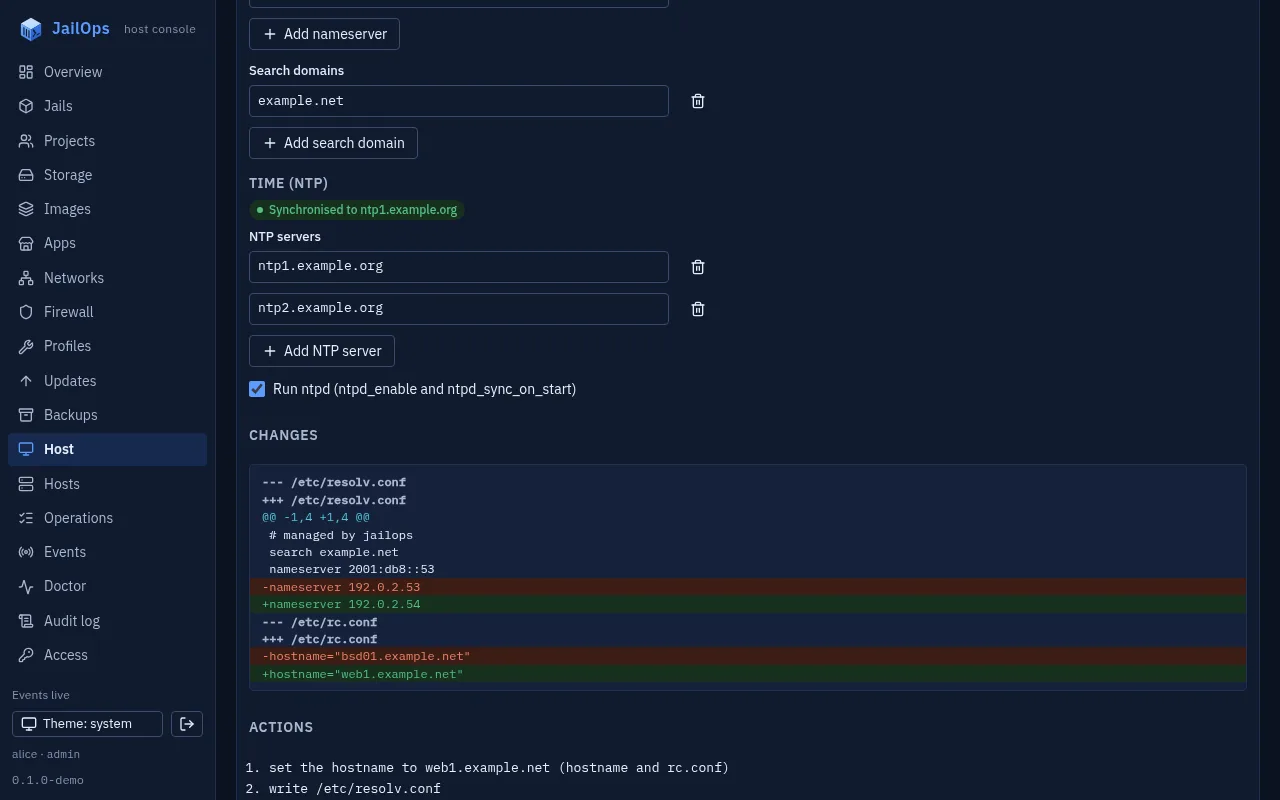
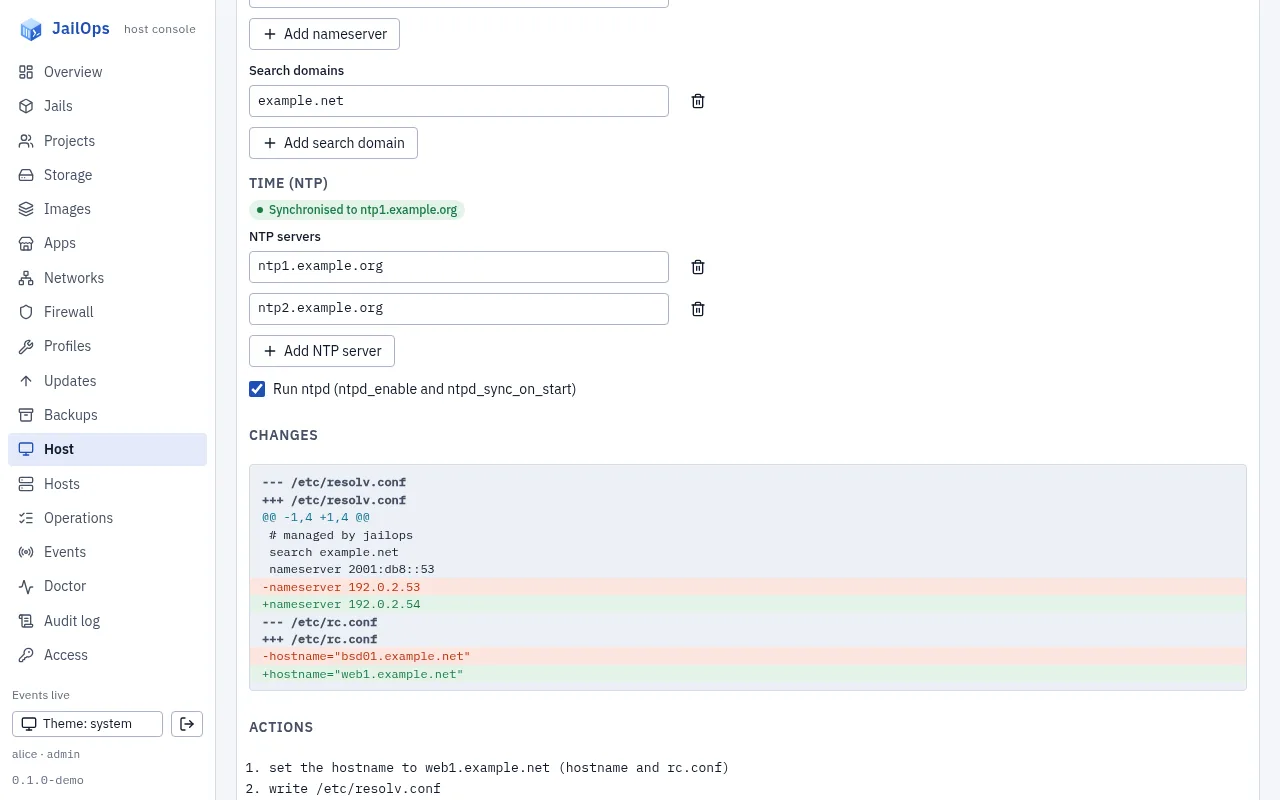
jailops doctor reports host.identity (not managed, or drift from what was applied) and host.ntp (ntpd enabled and synchronised).
The host's own firewall
What may reach the host itself.
The second module decides what may reach the host: ssh, the console and the API, and any port you open. The jails keep their own anchors and their own policies; this module does not decide for them.
Without the module, JailOps never touches pf.conf: you add the anchor line and JailOps loads only its anchors, as before. With the module on in both switches, and only then, JailOps owns:
/etc/pf.conf, as a whole file that starts with# managed by jailops, rendered by the root helper from a few settings, never from rule text the daemon sends.- Two
rc.confvariables:pf_enable, set toYES, andpf_rules, only when it names another file.
You choose a template and fill in a few fields:
| Template | What it passes to the host |
|---|---|
default | ssh (port 22 unless you name others, up to four) and the console and API port, each from the sources you name or from anywhere; everything else inbound is blocked |
custom-rules | default, plus up to 64 allow rows of a protocol, ports, sources and a comment |
open | Everything, for a host that sits behind another firewall |
Every template keeps what a host cannot do without: loopback, the jails' anchors first among the filter rules, neighbour discovery and router advertisements, path MTU discovery and ICMP errors. Sources are addresses, prefixes, or @name of an address set you define in the same settings, which becomes a pf table. Ping and logging of what the final block rule drops are switches.
jailops host firewall show prints the rules in plain words, jailops host firewall diff shows how /etc/pf.conf differs from what JailOps wrote, and jailops doctor reports host.firewall: not managed, enabled on one side only, a change waiting for its confirmation, or a hand edit.
Change the firewall without locking yourself out
Every change undoes itself unless you confirm it.
A firewall change can cut off the person who made it, and with them the console that would undo it. So every change of the host firewall is applied with a confirmation window: the new rules load at once, and unless you confirm them in time, the old file comes back on its own.
$ jailops host firewall set --ssh-from 192.0.2.0/24 \
    --ssh-from 2001:db8:a::/48 --dry-run
--- /etc/pf.conf
+++ /etc/pf.conf
  ...
-pass in proto tcp from any to (self) port 22
+pass in proto tcp from { 192.0.2.0/24, 2001:db8:a::/48 } to (self) port 22
dry-run: would
  check the rendered file with pfctl -n (it parses)
  keep a copy of /etc/pf.conf (snapshot)
  write the pending record: the change reverts in 120 seconds unless it is confirmed
  write /etc/pf.conf
  pfctl -f /etc/pf.conf
  wait for the confirmation (jailops host confirm)

$ jailops host firewall set --ssh-from 192.0.2.0/24 \
    --ssh-from 2001:db8:a::/48 --confirm-within 60
# the same diff and steps, then:
host firewall: applied; it REVERTS at 09:01:00Z (in 60 s) unless you confirm it: jailops host confirm --id 4be1f0c29a7d6e35

# open a new ssh session: if it gets in, the new rules let you in
$ jailops host confirm
Pending:     nothing waits for a confirmation
Last:        firewall change 4be1f0c29a7d6e35 was confirmed at ...

# or, changed your mind before the deadline:
$ jailops host revert              # puts the snapshot back now
$ jailops host pending             # what waits, the seconds left, how the last change ended
- The window is
--confirm-within: seconds, or90s,5m. The default is 120 seconds, the shortest 10 seconds and the longest 30 minutes. - Confirm over the new rules. A confirmation that arrives through the new configuration proves you can still reach the host; that is the point. If the new rules shut you out, do nothing and wait: the old file comes back at the deadline.
- The timer belongs to the root helper, not to the daemon or the console. A lost connection, a restarted daemon or a closed browser cannot stop the revert. If the helper itself restarts, it reads the pending record first and arms the timer again for the time left, or reverts at once when the deadline has passed.
- One change waits at a time. While it waits, any other host change answers
busywith the id of the pending one. A dry run still works. - A lock-out guard comes first. The daemon passes the address your request came from. When that address could reach neither ssh nor the console under the new rules, the apply is refused before anything is written. Through the local unix socket or a hub the address is unknown: then the apply needs
--i-know, and the window still applies.
In the console, the Firewall section of the Host page has the rules, an editor with inline validation, Preview with the diff, and Apply with the window explained. While a change waits, every page shows a banner with a countdown, Confirm and Revert, also after a reload.
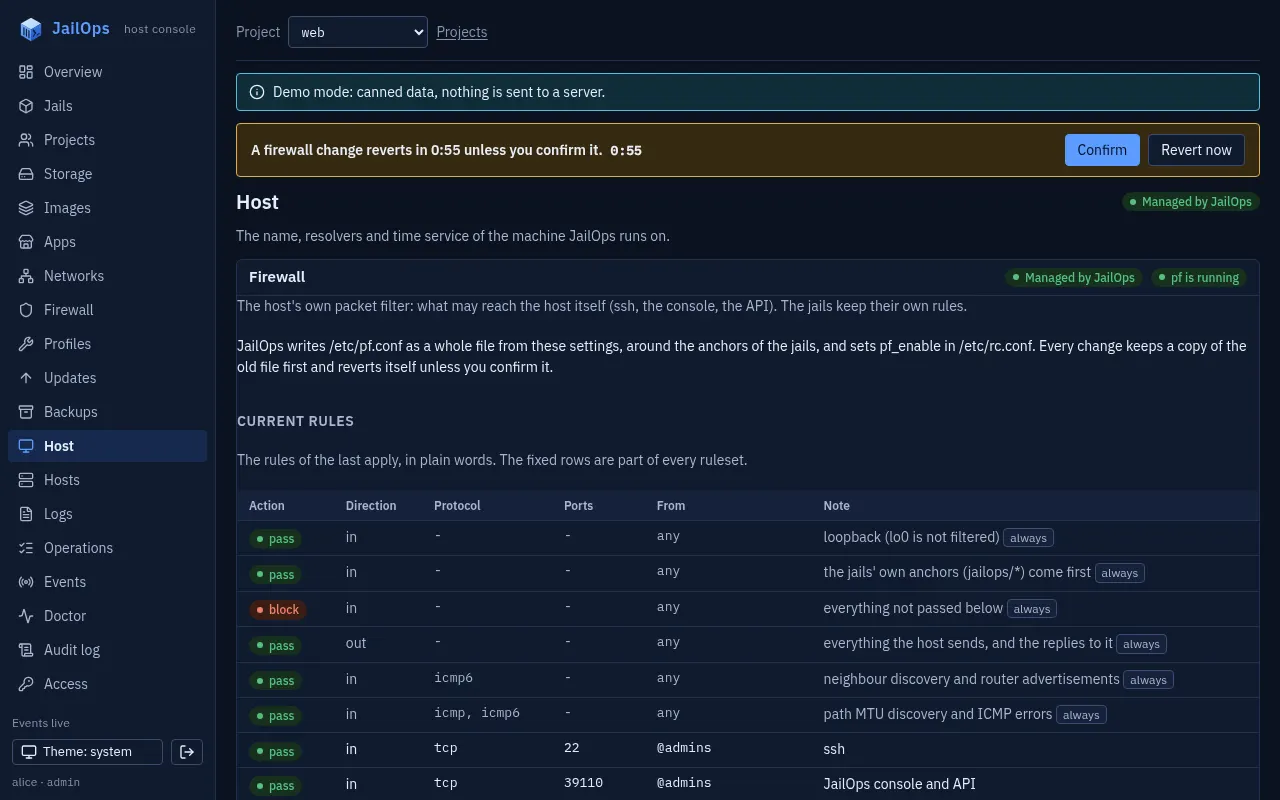
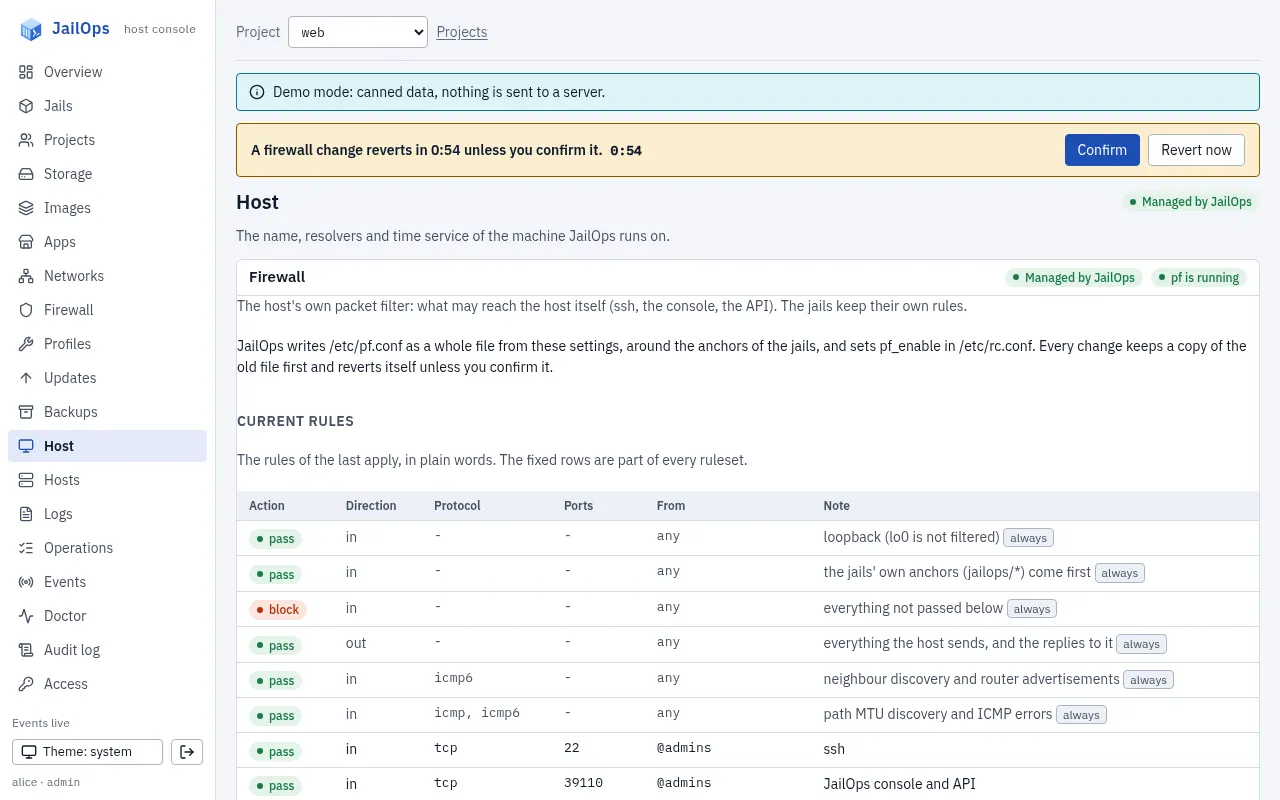
What it does not do.
- The rules are for the host only. Traffic to the jails is decided by their anchors, and an allow row opens a port of the host, not of a jail.
- A change you confirmed stays, even if it locks out a session later (an address that changes, say). Put a snapshot back with
jailops host restorefrom a local shell or the console. - A hand-written
pf.confwith things the templates lack (the host's own NAT, queues, other anchors) shows them as removed lines in the first diff. The first apply keeps your file as a snapshot, sojailops host restorebrings it back. - No boot environment is made before a firewall change; commit confirmed and the snapshots are the way back.
- The package also installs a boot script,
jailops_revert, meant to put an unconfirmed change back before the network starts after a reboot. Its place in the boot order has not been proven with a real reboot yet: do not count on a reboot to undo a change. Confirm it or revert it.
Two switches, both needed
The daemon cannot turn it on by itself.
A module is managed only when both files name it. Then restart both services. One line in /etc/rc.conf does the same for both programs: jailops_appliance="YES", with jailops_appliance_modules to pick modules (default: all of them). rc.conf belongs to root, as priv.conf does, so the daemon still cannot opt itself in.
# /usr/local/etc/jailops/jailopsd.yaml
host:
  manage:
    modules: [identity, firewall]

# /usr/local/etc/jailops/priv.conf, one line per module
host-manage = identity
host-manage = firewall

# service jailopsd restart
With either line missing, reading still works and every change is refused with not_managed, and the answer names the lines to add. jailops host show and jailops host firewall show print them too.
Why two. jailopsd.yaml belongs to the daemon. priv.conf belongs to root and sets what the small root helper will do for the daemon. If the daemon's switch alone were enough, a compromised daemon could opt itself in by ignoring its own configuration. The helper's switch is the boundary: without host-manage, the helper refuses the module's changes whatever the daemon asks. The daemon's switch makes the choice visible where you configure the daemon, and gives you a clear error instead of a refusal from below.
The daemon also never sends the helper a file or a command line. It sends validated fields; the helper checks them again and renders the files itself. A host name, a nameserver or an NTP server cannot carry a newline, a space, a quote or a #, so none can add a line to a file. For the firewall the helper renders the whole pf.conf from the settings, checks it with pfctl -n, and runs pfctl only in six fixed forms of its own.
The safety net
A way back from every change.
- A copy of exactly what it touches (built). Before a change the helper copies each file the module owns into a snapshot in its own root-only directory; for
rc.confit records only the values of the module's own variables, and a restore puts back only those.jailops host restoreputs them back and first takes a snapshot of its own, so a restore can be undone too. The last 20 are kept. A failed step puts the copy back on its own. - Commit confirmed (built, for the firewall; designed for the network). A change that could cut you off is applied with a confirmation window and reverts itself unless you confirm it. The timer lives in the root helper, not in the daemon or the console, so the revert happens even when the change locked you out. See above.
- A boot environment first (designed, for updates and the network). A risky module creates one with
bectlbefore the change: the last way back, from the loader menu.
Snapshots live in the helper's directory and not in the daemon's, on purpose: a restore writes into /etc as root, so the copies must be what the helper itself took from the host and nothing else.
What is built, what is designed
The plain list.
| Part | What it covers | Status |
|---|---|---|
| The two switches | host.manage.modules in jailopsd.yaml, host-manage in priv.conf | Built |
| Identity | Host name, resolvers, NTP: API, CLI, console page, doctor checks | Built |
| Host firewall | The host's own pf.conf from a template, around the JailOps anchors: API, CLI, console section and banner, doctor check. Rules for the host only, not for the jails; no boot environment first; the revert at boot not yet proven on a real reboot | Built |
| Snapshots and restore | A copy of what a module change touches, taken before it, and restore in one command | Built |
| Commit confirmed | A firewall change reverts unless confirmed; the timer is the root helper's. For the network: designed | Built |
| Boot environments | A boot environment before a risky change | Designed |
| Network | Interfaces, addresses, default routes, VLAN and LAGG | Designed |
| Updates | Base system and packages with pkg, a boot environment first | Designed |
| System | Reboot and shutdown, a sysctl allow-list, ssh keys and users | Designed |
| Storage overview | Pools, disks and the scrub schedule, read-only first | Designed |
One switch in rc.conf, setup token, first-run wizard | The administrator, the host name, the certificate, the host firewall, storage and a network, from the browser; the network and pool steps wait for the network module and the installer | Built |
| Installer image | From an empty disk to a host you sign in to | Designed |
The whole design, module by module, with what each may touch: docs/appliance.md.